Experteneinblicke: Die wichtigsten Erkenntnisse
- Für Einsteiger besteht das größte Klang-Upgrade darin, die Audioverarbeitung von einem gemeinsam genutzten System-Chip auf dedizierte DAC-Hardware zu verlagern – und ein Android-DAP wie der G7 Pro ist dafür der reibungsloseste Weg.
- Dual-Band-WLAN wird in Datenblättern oft übersehen, ist aber für das Hören zu Hause entscheidend: Die 5-GHz-Verbindung sorgt dafür, dass Tidal- und Spotify-Streams mit hoher Bitrate sofort puffern, und verhindert den qualitätsmindernden „adaptive Bitrate“-Abfall, der den Hi-Res-Genuss zunichtemacht.
- Erweiterbarer microSD-Speicher zählt mehr als reiner interner Speicher – dank austauschbarer Karten kann Ihre Bibliothek wachsen, ohne dass Sie je für ein Geräte-Upgrade bezahlen müssen.
Was genau ist ein Android-Hi-Res-Audio-Player?
Wenn Sie sich schon einmal gefragt haben, warum Ihre Musik selbst über ordentliche Kopfhörer etwas flach klingt, sind Sie auf etwas Wichtiges gestoßen. Ein Android-Hi-Res-Audio-Player ist ein taschengroßes Gerät für genau eine Aufgabe: Musik so wiederzugeben, wie sie im Studio aufgenommen wurde, ganz ohne Abkürzungen. Stellen Sie es sich als dediziertes Musik-Gehirn vor, das mit Android läuft, sodass Sie Apps wie Spotify oder Tidal installieren können – aber mit audiophiler Hardware unter der Haube, die Ihr Alltagsgerät einfach nicht erreicht.
In diesem Guide erklären wir genau, was Hi-Res-Audio bedeutet (versprochen, ohne Fachjargon), zeigen Ihnen, wie Streaming und lokale Wiedergabe auf einem Gerät zusammenspielen, und stellen den HIFI WALKER G7 Pro Android-Player vor – eine einsteigerfreundliche Option, die alle Grundlagen abdeckt, ohne eine steile Lernkurve.

- ►1. Was genau ist ein Android-Hi-Res-Audio-Player?
- ►2. Hi-Res-Audio vs. normales Streaming: einfach erklärt
- ►3. Warum Android als Betriebssystem ein Gewinn für Musikliebhaber ist
- ►4. Der HIFI WALKER G7 Pro: der beste Android-Musikplayer für Einsteiger
- ►5. Tidal und Spotify auf einem Hi-Res-Audio-Player mit WLAN streamen
- ►6. Ihre Hörecke zu Hause einrichten: Ablauf für Einsteiger
- ►7. Ihr Setup erweitern: den G7 Pro mit anderem HIFI WALKER Equipment kombinieren
- ►8. Häufig gestellte Fragen zu Android-Hi-Res-Audio-Playern
Hi-Res-Audio vs. normales Streaming: einfach erklärt
Hier eine hilfreiche Analogie: Stellen Sie sich ein Gemälde vor, gespeichert als winziges JPEG im Vergleich zur Original-Leinwand. Beide zeigen dieselbe Szene, aber eines hat durch die Komprimierung Details verloren. Standard-Streaming mit 128–256 kbps macht mit Musik dasselbe – es verwirft Audioinformationen, die Ihre Ohren tatsächlich wahrnehmen können, besonders in einem ruhigen Raum über hochwertige Kopfhörer.
Standard-komprimiertes Audio
- MP3 / AAC mit 128–256 kbps
- Höhen werden abgeschnitten
- Feine räumliche Details entfernt
- Verarbeitung über einen All-in-one-SoC ohne Audio-Fokus
- Audio konkurriert mit Hintergrundprozessen um Rechenleistung
Hi-Res auf einem dedizierten Android-Player
- FLAC, WAV und verlustfreie Streaming-Stufen
- Voller Frequenzumfang erhalten
- Mikrodetails und Klangbühne bleiben intakt
- Dedizierte DAC- und Verstärker-Hardware
- Android-Betriebssystem, das ausschließlich für musikbezogene Apps freigehalten wird
Der Unterschied wird besonders beim Hören zu Hause spürbar – zurückgelehnt im bequemen Sessel, Augen geschlossen, Kopfhörer auf. Genau in diesem Szenario spielt ein dedizierter Android-DAP fürs Hören zu Hause seine Stärken aus.
Warum Android als Betriebssystem ein Gewinn für Musikliebhaber ist
Nicht jeder dedizierte Audio-Player läuft mit Android. Manche älteren oder günstigeren DAPs verwenden geschlossene, proprietäre Betriebssysteme – das heißt, Sie sind auf die vorinstallierten Apps beschränkt. Ein Android-basierter Player ändert für Einsteiger alles, weil er genauso funktioniert wie das Gerät, das Sie bereits kennen, nur eben auf Audio optimiert.
Google Play Store öffnen
Der vollständige Google Play Store ist auf dem G7 Pro verfügbar. Suchen Sie nach Spotify, Tidal, YouTube Music oder einem anderen Streaming-Dienst, den Sie bereits abonniert haben.
Mit Ihrem bestehenden Konto anmelden
Kein neues Abo nötig. Melden Sie sich mit demselben Konto an, das Sie schon heute nutzen, und Ihre Playlists, gespeicherten Alben und Einstellungen werden sofort übernommen.
Mit dem WLAN verbinden (Dual-Band)
Der G7 Pro unterstützt Dual-Band-WLAN, sodass Ihre Musik unterbrechungsfrei streamt, selbst in Haushalten mit überlasteten 2,4-GHz-Netzwerken. Wechseln Sie für schnelleres Puffern hochwertiger Titel zu 5 GHz.
Kopfhörer aufsetzen und Play drücken
Das Audiosignal läuft jetzt über dedizierte DAC- und Verstärker-Hardware statt über einen gemeinsam genutzten System-Chip. Den Unterschied bemerken Sie fast sofort – selbst bei Titeln, die Sie schon hundertmal gehört haben.
Genau dieser Ablauf macht den HIFI WALKER G7 Pro Android-Player zu einem so klugen ersten Schritt. Sie müssen weder Ihre Musikbibliothek neu aufbauen noch neue Software erlernen – Sie bringen Ihr bestehendes Streaming-Leben einfach mit und hören es nur besser.
Der HIFI WALKER G7 Pro: der beste Android-Musikplayer für Einsteiger
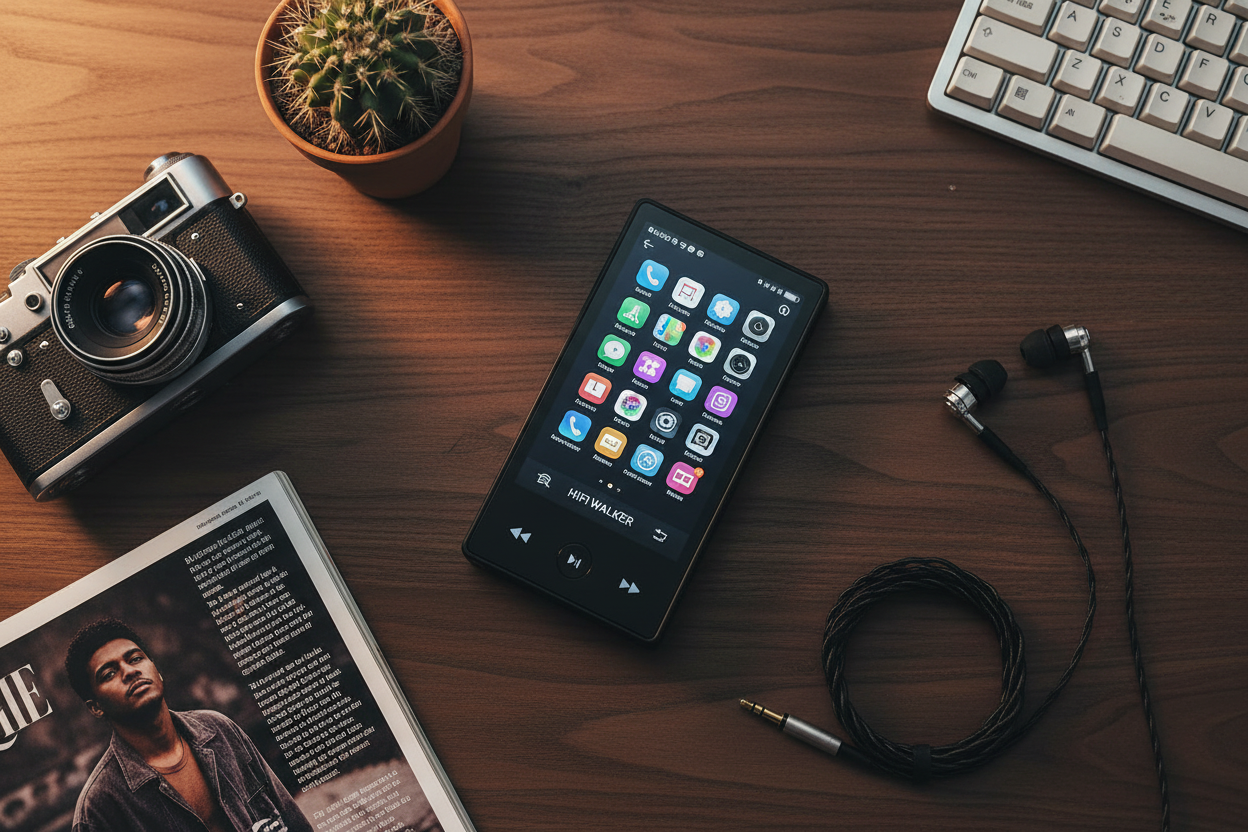
Der HIFI WALKER G7 Pro Android-Player ist speziell für Menschen entwickelt, die audiophilen Klang ohne audiophile Lernkurve wollen. Für $104 liegt er genau im richtigen Punkt: leistungsstark genug, um zu überzeugen, und zugänglich genug, dass Sie sich am ersten Tag nicht überfordert fühlen.

Was ihn in dieser Preisklasse wirklich hervorhebt, ist die Kombination von Funktionen, für die man normalerweise mehr ausgeben müsste. Sehen wir uns an, was für das Hören zu Hause und den Alltag am wichtigsten ist.
Das Dual-Kamera-System – 13 MP hinten und 5 MP vorne – ist ein Bonus, der den G7 Pro zu mehr als nur einem Musikplayer macht. Halten Sie den Moment fest, der die Playlist inspiriert hat, oder drehen Sie ein kurzes Video, während Ihr Lieblingsalbum im Hintergrund läuft. Genau diese Vielseitigkeit rechtfertigt, dass Sie ihn den ganzen Tag in der Tasche (oder auf dem Nachttisch) haben.

Tidal und Spotify auf einem Hi-Res-Audio-Player mit WLAN streamen
Eine der häufigsten Fragen von Einsteigern lautet: Kann ich mein Streaming-Abo auf einem dedizierten Audio-Player nutzen? Bei einem Android-basierten Gerät wie dem G7 Pro lautet die Antwort ganz klar: Ja. Da er mit einem vollständigen Android-Betriebssystem läuft, installieren und funktionieren alle wichtigen Streaming-Plattformen genau wie erwartet.
Spotify auf dem G7 Pro
- Direkt aus dem Google Play Store installieren
- Zugriff auf Ihre bestehenden Playlists und „Lieblingssongs“
- Aktivieren Sie in den Einstellungen die Qualitätsstufe „Sehr hoch“ für den besten Stream
- Titel für die Offline-Wiedergabe über WLAN herunterladen
- Bluetooth-Ausgabe an Ihre bevorzugten kabellosen Kopfhörer
Tidal auf dem G7 Pro
- Direkt aus dem Google Play Store installieren
- Zugriff auf Tidal HiFi und die verlustfreien Max-Stufen
- FLAC-Qualität über Dual-Band-WLAN streamen
- Alben während einer WLAN-Sitzung zu Hause offline speichern
- Jeden Titel von der dedizierten DAC-Hardware verarbeiten lassen
Das Dual-Band-WLAN des HIFI WALKER G7 Pro Android-Player ist kein kleines Detail. In einer Umgebung zu Hause bedeutet 5-GHz-WLAN schnelleres Puffern, sodass hochwertige Tidal-Streams sofort ohne Aussetzer starten – genau das, was Sie für eine konzentrierte Hörsitzung wollen. Das ist ein wichtiger Grund, warum sich der G7 Pro als einer der besten Hi-Res-Audio-Player mit WLAN fürs Zuhause einen Namen gemacht hat.
↑ Zurück nach oben
Zurück nach oben ↑Ihre Hörecke zu Hause einrichten: Ablauf für Einsteiger
Sie brauchen weder einen eigenen Hörraum noch Equipment für tausend Dollar, um Hi-Res-Audio zu Hause zu genießen. Der Vorteil eines Android-DAPs fürs Hören zu Hause liegt darin, dass er Hürden abbaut. Hier ein einfaches Setup, das unter zehn Minuten dauert und schon vom ersten Tag an wirklich beeindruckend klingt.
Ihren Hörplatz wählen
Ein bequemer Sessel, eine Sofaecke oder sogar ein Sitzsack funktionieren bestens. Der große Touchscreen des G7 Pro macht das Durchsuchen von Playlists auch aus der Entfernung bequem, ohne dass Sie die Augen zusammenkneifen müssen.
Kopfhörer anschließen
Schließen Sie Ihre bevorzugten kabelgebundenen Kopfhörer für das reinste Signal an, oder koppeln Sie Bluetooth-Kopfhörer für kabellose Freiheit. Beide Optionen leiten das Audiosignal über die dedizierte Hardware des G7 Pro.
Ihre lokale Musikbibliothek laden
Kopieren Sie FLAC-, WAV- oder MP3-Dateien auf eine microSD-Karte und stecken Sie diese in den G7 Pro. Dank des erweiterbaren Speichers können Sie Tausende von Alben mitnehmen, ganz ohne Cloud-Abhängigkeit.
Ihre Streaming-App öffnen
Starten Sie Spotify, Tidal oder den Dienst Ihrer Wahl. Stellen Sie die Audioqualität in den App-Einstellungen auf die höchste verfügbare Stufe, um die dedizierte DAC-Hardware optimal zu nutzen.
Entdecken und genießen
Stöbern Sie in empfohlenen Playlists, entdecken Sie alte Favoriten neu oder probieren Sie ein verlustfreies Album, das Sie noch nie richtig gehört haben. Achten Sie auf Details – Nachhall, Atempausen zwischen den Noten, räumliche Breite –, die vorher verborgen waren.

Ihr Setup erweitern: den G7 Pro mit anderem HIFI WALKER Equipment kombinieren
Sobald Sie erlebt haben, was der G7 Pro leisten kann, möchten Sie vielleicht noch mehr vom HIFI WALKER Sortiment entdecken. Die Marke bietet ein gut abgestimmtes Angebot an Playern für den Fall, dass sich Ihr Hörgeschmack weiterentwickelt – sowie Zubehör, das Ihre Investition schützt.

Möchten Sie das gesamte Sortiment an Android- und Hi-Res-Playern von HIFI WALKER entdecken? Durchstöbern Sie die vollständige HIFI WALKER Hi-Res-Audio-Player-Kollektion, um Modelle direkt zu vergleichen. Sobald Sie tiefer einsteigen möchten, finden Sie ausführlichere technische Vergleiche im Blog mit DAP-Tests und -Vergleichen.
Jede Bestellung bei HIFI WALKER wird versandkostenfrei geliefert, kommt mit einem 30-tägigen Rückgaberecht und ist durch eine 1-Jahres-Garantie abgesichert – Ihr erster Schritt in die Hi-Res-Audiowelt ist also völlig risikofrei. Es gibt keinen besseren Zeitpunkt zum Starten als jetzt.
Häufig gestellte Fragen zu Android-Hi-Res-Audio-Playern
Noch Fragen? Hier sind die häufigsten, die uns Einsteiger beim Einstieg in Hi-Res-Audio stellen.
Häufig gestellte Fragen
Q1: Brauche ich ein spezielles Abo, um einen Android-Hi-Res-Audio-Player zu nutzen?
Ein spezielles Abo ist nicht erforderlich. Sie installieren Streaming-Apps – wie Spotify oder Tidal – direkt aus dem Google Play Store auf Geräten wie dem HIFI WALKER G7 Pro Android-Player und melden sich dann mit Ihrem bestehenden Konto an. Wenn Sie verlustfreie Streams möchten, hilft ein Upgrade auf Tidal HiFi oder Spotify Premium, aber das Gerät selbst funktioniert mit jeder Stufe.
Q2: Kann ich Musik ohne Internetverbindung hören?
Absolut. Sie können FLAC-, WAV-, MP3- und andere Audiodateien auf eine microSD-Karte laden und diese in den G7 Pro stecken, um vollständig offline zu hören. Viele Streaming-Apps erlauben zudem das Herunterladen von Playlists über WLAN für die Offline-Nutzung, sodass Sie das Beste aus beiden Welten bekommen.
Q3: Lohnt sich ein Android-DAP fürs Hören zu Hause, wenn ich schon einen guten Bluetooth-Lautsprecher habe?
Ein Bluetooth-Lautsprecher und ein dedizierter Audio-Player lösen unterschiedliche Probleme. Der Lautsprecher sorgt für raumfüllenden Klang; der Android-Hi-Res-Audio-Player bestimmt die Qualität des Signals, bevor es das Gerät überhaupt verlässt. Die Kombination eines G7 Pro mit einem guten Bluetooth-Lautsprecher verbessert tatsächlich das, was der Lautsprecher wiedergeben kann, da er ein höherwertiges Quellsignal empfängt.
Q4: Wie unterscheidet sich der HIFI WALKER G7 Pro von einem gewöhnlichen Android-Gerät?
Der entscheidende Unterschied ist die dedizierte Audio-Hardware. Der G7 Pro ist um einen echten DAC (Digital-Analog-Wandler) und eine Verstärkerstufe herum aufgebaut, während ein Allzweckgerät das Audiosignal über einen gemeinsam genutzten System-Chip zusammen mit allen anderen Funktionen leitet. Der G7 Pro bietet außerdem zwei Kameras (13 MP hinten, 5 MP vorne), erweiterbaren microSD-Speicher und Dual-Band-WLAN – für mehr Multimedia-Funktionalität in einem fokussierten, audiozentrierten Formfaktor.
Q5: Wie sehen Rückgabe- und Garantiebedingungen von HIFI WALKER aus?
HIFI WALKER bietet versandkostenfreien Versand für alle Bestellungen, ein 30-tägiges, unkompliziertes Rückgabe- und Umtauschfenster sowie eine 1-Jahres-Herstellergarantie. Sie können Ihre Reise in die Hi-Res-Audiowelt mit vollem Vertrauen beginnen – es besteht kein finanzielles Risiko, falls das Gerät nicht zu Ihnen passt.