Expert Insights: Key Takeaways
- The ESS9038Q2M chip in the HIFI WALKER D20 is the same DAC silicon found in dedicated desktop amplifiers costing several times more — getting it in a 38g USB-C dongle is genuinely remarkable value engineering.
- For long-haul flights, the ALPS encoder knob is more than a luxury — precise tactile volume control in a dark cabin is meaningfully more usable than hunting for a software slider on a dimmed phone screen.
- SNR of 115dB/1kHz and dynamic range of >118dB help the D20 keep noise low and preserve detail — pairing it with a quality earphone like the A20Pro can make the upgrade easier to hear.
So, What Exactly Is a Hi-Res Audio Dongle?
You've probably heard the term hi-res audio dongle thrown around in audiophile forums — but if you're new to the hobby, it can feel like a foreign language. At its core, a hi-res audio dongle is a tiny USB-C device that plugs between your phone (or laptop) and your headphones, converting digital audio data into sound with far greater precision than your built-in audio hardware ever could.
Think of it like upgrading the lens on a camera. Your phone already takes photos, but a better lens captures light with dramatically more detail. A hi-res audio dongle does the same thing for sound — pulling out detail from high-resolution audio files that your phone's internal chip simply can't reproduce.
Without a DAC Dongle
- Your phone's built-in chip handles conversion
- Limited dynamic range and channel separation
- Often noisy output — especially under load
- Incapable of decoding DSD or high-bitrate PCM
With a Hi-Res Audio Dongle
- Dedicated, audiophile-grade DAC chip handles everything
- SNR 115dB/1kHz and dynamic range >118dB
- Clean, powerful output even for demanding headphones
- PCM 32bit/768kHz support and DSD512 hardware decode

- ►1. So, What Exactly Is a Hi-Res Audio Dongle?
- ►2. Why Long Flights Are the Perfect Reason to Upgrade
- ►3. DSD512 and PCM 768kHz — What Do These Numbers Actually Mean?
- ►4. Meet the HIFI WALKER D20: A Flagship DAC in Your Pocket
- ►5. Balanced vs. Single-Ended Output: Which Should You Use?
- ►6. What Headphones Work Best With a Hi-Res Audio Dongle?
- ►7. How to Get Started: Your First Hi-Res Audio Dongle Setup
- ►8. Is a Hi-Res Audio Dongle Worth It for a Beginner?
Why Long Flights Are the Perfect Reason to Upgrade
If there's one place where audio quality genuinely changes your experience, it's on a 10-hour flight. Cabin noise hovers around 85dB — so the music you're listening to has to punch through that wall of engine hum. With a weak audio output, you crank the volume and still hear a muddy, flat soundstage. With a proper USB-C DAC dongle for travel, you get authoritative, controlled output that cuts through the noise without distortion.
There's also the physical reality of long-haul travel: you want something small enough to forget it's in your carry-on, light enough not to add weight anxiety, and reliable enough to last the journey. A pocket-sized dongle that weighs under 40g and requires zero setup ticks every box.
Pack It Once, Use It Everywhere
At just 38g, the D20 slips into your carry-on pocket, laptop bag, or even a jacket pocket without adding much weight.
Plug In Before Takeoff
Connect the USB-C end to your phone or laptop. No driver installation needed on most platforms — it's plug and play. Your device recognizes it in seconds.
Choose Your Output
Plug your headphones into the 3.5mm single-ended jack for casual listening, or use the 4.4mm balanced output for maximum power and channel separation on demanding over-ears.
Dial In Your Volume
Use the precision ALPS encoder knob to set your listening level. Tactile, smooth, and accurate — no fumbling with a phone screen in a dark cabin.
DSD512 and PCM 768kHz — What Do These Numbers Actually Mean?
Here's where first-timers often get lost. Terms like DSD512 and PCM 768kHz sound intimidating, but the concepts are straightforward once you have the right analogy.
PCM — The Digital Photograph
- PCM records audio as a grid of samples taken over time
- Higher sample rate (e.g. 768kHz) = more snapshots per second
- Higher bit depth (e.g. 32bit) = finer detail in each snapshot
- CD quality is 16bit/44.1kHz — PCM 768kHz is over 17× the resolution
DSD — The Analog Film Scan
- DSD uses a different method: a single-bit stream at very high frequency
- DSD512 runs at 512× the base DSD rate (about 22.5 MHz)
- Sounds incredibly smooth and natural — often described as 'closest to analog'
- DSD512 hardware decoding lets compatible files be handled by the D20's DAC chain
The key takeaway: higher numbers tell you what file types and sample rates the hardware can support. A dedicated DSD512 dongle built around a chip like the ESS9038Q2M can handle demanding hi-res formats when your source file and playback app support them.

Meet the HIFI WALKER D20: A Flagship DAC in Your Pocket
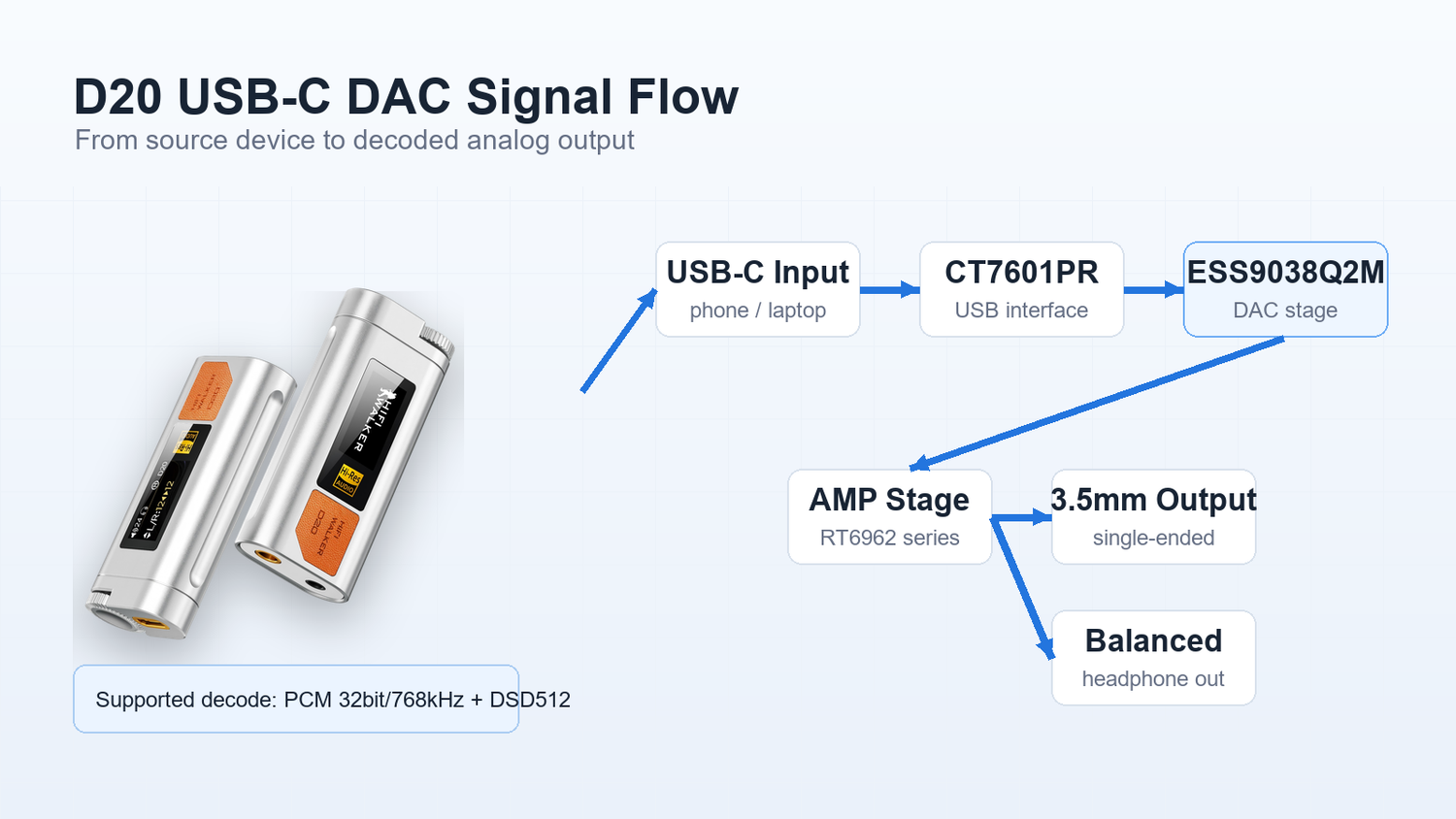
If you're looking for the best entry point into hi-res audio dongles without compromise, the HIFI WALKER D20 USB-C DAC/Amp Dongle — Balanced Headphone Amplifier delivers specs that punch far above its price class. Built around the ESS9038Q2M DAC chip, it supports PCM 32bit/768kHz and DSD512 hardware decoding for compatible files and apps.
That 380mW balanced output figure is worth pausing on. Most USB dongles in this category struggle to drive headphones above 100Ω with authority. The HIFI WALKER D20 handles 8–300Ω headphones — meaning it works equally well with budget earbuds and serious over-ear cans. The CNC-machined aerospace-grade aluminum body keeps the whole package at 38g while feeling premium in hand.

Balanced vs. Single-Ended Output: Which Should You Use?
The HIFI WALKER D20 USB-C DAC/Amp Dongle gives you two output options: a 3.5mm single-ended jack and a 4.4mm balanced jack. For most beginners, this distinction feels technical — but it's actually simple once you know what each does.
3.5mm Single-Ended
- Works with any standard headphone or earphone cable
- Great for everyday earbuds and most IEMs
- Lower output power — ideal for sensitive, easy-to-drive earphones
- No special cable required
4.4mm Balanced
- Requires a headphone with a 4.4mm Pentaconn balanced cable
- Up to 380mW+380mW output at 32Ω — significantly more power
- Channel separation rated up to 90dB — a cleaner separation spec than basic phone output
- Best for over-ear headphones 50Ω and above
Our recommendation for new users: start with 3.5mm using your existing headphones. Once you hear what the ESS9038Q2M chip can do, you'll naturally want to explore balanced cables. The D20 is ready whenever you are — no need to buy a new dongle later.

↑ Back to Top
Back to Top ↑What Headphones Work Best With a Hi-Res Audio Dongle?
A great dongle deserves a great headphone. The good news: you don't need to spend a fortune. The HIFI WALKER D20 drives headphones from 8Ω to 300Ω, so your current pair almost certainly works. But if you want to maximize what hi-res decoding can reveal, pairing with a quality earphone makes a real difference.
HIFI WALKER's own A20Pro Hi-Fi Earphone is purpose-built for this kind of pairing — resolving detail, balanced tuning, and a cable connector that plays nicely with the D20's 3.5mm output. It's a sensible first upgrade alongside the dongle.

Beyond impedance, look for earphones with a wide frequency response and low distortion spec. The HIFI WALKER D20's SNR of 115dB/1kHz and dynamic range of >118dB give it enough measured headroom to benefit from a capable earphone. Explore our full range at the HIFI WALKER audio collection.
How to Get Started: Your First Hi-Res Audio Dongle Setup
Setting up a portable DAC amp dongle for the first time is genuinely easier than setting up a Bluetooth speaker. Here's the complete beginner workflow — from unboxing to your first hi-res listening session.
Connect the D20 to Your Source
Plug the USB-C end of the HIFI WALKER D20 into your phone or laptop. Windows XP / 7 / 8.1 / 10 and macOS 10+ are supported — no driver installation required on most setups.
Select the Right Output Jack
If your headphones use a standard 3.5mm plug, use the single-ended output. If you have a 4.4mm balanced cable, use the balanced output for maximum power and channel separation.
Set Your Source to High-Quality Audio
In your music player or streaming service settings, select the highest available audio quality. The ESS9038Q2M DAC chain supports PCM up to 32bit/768kHz and DSD512 hardware decoding when your file and app support those formats.
Use the ALPS Encoder Knob
Turn the precision ALPS encoder knob to set your listening volume. It's tactile and smooth — far more satisfying than a software slider, and easier to adjust in a dark airplane cabin.
Check the TFT Display
The D20's 0.96 inch TFT display gives quick playback/status feedback, so you are not relying only on your phone screen while listening.
That's genuinely all there is to it. The HIFI WALKER D20 USB-C DAC/Amp Dongle — Balanced Headphone Amplifier is designed to be the most friction-free entry point into hi-res audio — no configuration menus, no compatibility headaches. Just better sound, immediately. Orders ship free, and every D20 is covered by a 30-day return guarantee and a 1-year warranty.
Is a Hi-Res Audio Dongle Worth It for a Beginner?
Here's the honest answer: yes — especially as a travel audio accessory. The investment is modest (the HIFI WALKER D20 is $99), the upgrade in sound quality is immediately audible to most listeners, and the form factor means you'll actually use it rather than leaving it at home.
For the price of a mid-range carry-on accessory, you get a dedicated ESS9038Q2M DAC, DSD512 hardware decode, up to 380mW balanced output, and a 38g CNC aluminum body. There's a reason seasoned audiophiles recommend this category as the single highest-impact upgrade for travelers.
Ready to hear what your music actually sounds like? The HIFI WALKER D20 USB-C DAC/Amp Dongle ships free, comes with a 1-year warranty, and is backed by a 30-day return guarantee. Also, check out more guides on the HIFI WALKER blog to continue your hi-res audio journey.
Frequently Asked Questions
Q1: What is a hi-res audio dongle and do I need one?
A hi-res audio dongle is a compact USB-C device that replaces your phone or laptop's built-in audio hardware with a dedicated DAC (digital-to-analog converter) chip. If you care about audio quality — especially on long trips — it's the single most impactful upgrade you can make. The HIFI WALKER D20 USB-C DAC/Amp Dongle, for example, uses the ESS9038Q2M chip to support PCM up to 32bit/768kHz and DSD512 hardware decoding, beyond what a basic phone audio path is built for.
Q2: What does DSD512 mean on a USB-C DAC dongle?
DSD512 refers to a high-resolution audio format that runs at 512 times the base DSD sample rate — roughly 22.5 MHz. It's often described as the format that sounds closest to analog. When a dongle says it supports DSD512 hardware decoding (like the HIFI WALKER D20), it means the DAC chip processes the signal directly without converting it to PCM first, preserving the full warmth and texture of the original recording.
Q3: Will a hi-res audio dongle work with my existing headphones?
Almost certainly yes. The HIFI WALKER D20 USB-C DAC/Amp Dongle drives headphones from 8Ω to 300Ω — covering the vast majority of consumer earphones and over-ear headphones. You can use the 3.5mm single-ended output with any standard headphone. If your headphones have a 4.4mm balanced cable, you can use the balanced output for even more power and channel separation.
Q4: Do I need to install drivers for a USB-C DAC dongle?
For the HIFI WALKER D20 USB-C DAC/Amp Dongle, no driver installation is required on most platforms. It works plug-and-play with Windows XP / 7 / 8.1 / 10 and macOS 10+. Simply connect the USB-C end to your device and plug in your headphones — the device handles the rest automatically.
Q5: What is HIFI WALKER's return and warranty policy on the D20?
HIFI WALKER offers free shipping on the D20 USB-C DAC/Amp Dongle, a 30-day return guarantee, and a 1-year manufacturer warranty. Review the current return terms before ordering if you need specific return details.