
Expert Insights
- Lossless audio formats provide measurable improvement in dynamic range and frequency response compared to compressed alternatives, particularly noticeable on high-quality headphones and in quiet listening environments.
- Dedicated music players eliminate audio processing interference from phone operations, notifications, and background apps, resulting in cleaner signal paths and reduced digital noise.
- Proper metadata management becomes increasingly important as music libraries grow larger, with consistent tagging practices enabling sophisticated searching and playlist creation capabilities across devices.
The Complete Music Player Download & Transfer System
Finding the right music player mp3 player download approach transforms your portable audio experience from frustrating to fantastic. In 2026, the landscape of digital music consumption has evolved dramatically, yet many users still struggle with basic file management and device optimization.
Common Download Problems
- Low-quality compressed formats
- Incompatible file types
- Slow transfer speeds
- Lost metadata and artwork
Professional Solutions
- Lossless FLAC and DSD formats
- Universal format compatibility
- USB 3.0 high-speed transfer
- Preserved album art and tags
This comprehensive guide covers everything from choosing the right portable music players to mastering advanced transfer techniques that preserve audio quality and metadata integrity.

- ►1. The Complete Music Player Download & Transfer System
- ►2. Choosing Your Music Download Sources in 2026
- ►3. Essential Music Player Hardware for 2026
- ►4. Step-by-Step File Transfer Mastery
- ►5. Format Optimization and Quality Control
- ►6. Advanced Library Management Techniques
- ►7. Troubleshooting Common Transfer Issues
- ►8. Future-Proofing Your Music Collection
Choosing Your Music Download Sources in 2026
The quality of your music player experience starts with selecting appropriate download sources. Not all platforms offer the same audio fidelity or format options that dedicated music players can leverage.
High-resolution audio sources like HDTracks and Qobuz provide the pristine quality that justifies investing in a dedicated music player. These platforms offer lossless formats that smartphones simply cannot handle efficiently.
Evaluate Your Quality Needs
Determine if you need CD-quality (16-bit/44.1kHz) or high-resolution (24-bit/96kHz+) files based on your equipment and listening environment.
Choose Compatible Formats
Select FLAC for maximum compatibility or DSD for the ultimate in analog-like reproduction on capable devices.
Verify Metadata Completeness
Ensure downloads include complete album information, artwork, and proper file naming for seamless library organization.
Essential Music Player Hardware for 2026
Modern dedicated music players offer significant advantages over smartphones for serious listening. The key lies in understanding which features matter most for your specific needs and budget.

Entry-Level Benefits
- Dedicated audio processing
- Extended battery life
- No phone call interruptions
- Better file organization
High-End Advantages
- Audiophile-grade DAC chips
- Balanced output options
- model-specific DSD support
- Customizable sound signatures
The music player mp3 player download experience becomes truly exceptional when paired with hardware designed specifically for audio reproduction. Features like model-specific DAC implementation and dedicated amplifier sections deliver clarity impossible on general-purpose devices.

Step-by-Step File Transfer Mastery
Efficient file transfer requires understanding both your source material and destination device capabilities. The wrong approach can result in transcoded files, lost metadata, or compatibility issues.
Prepare Your Music Library
Organize files into logical folder structures (Artist/Album/Track) and verify all metadata tags are complete and accurate.
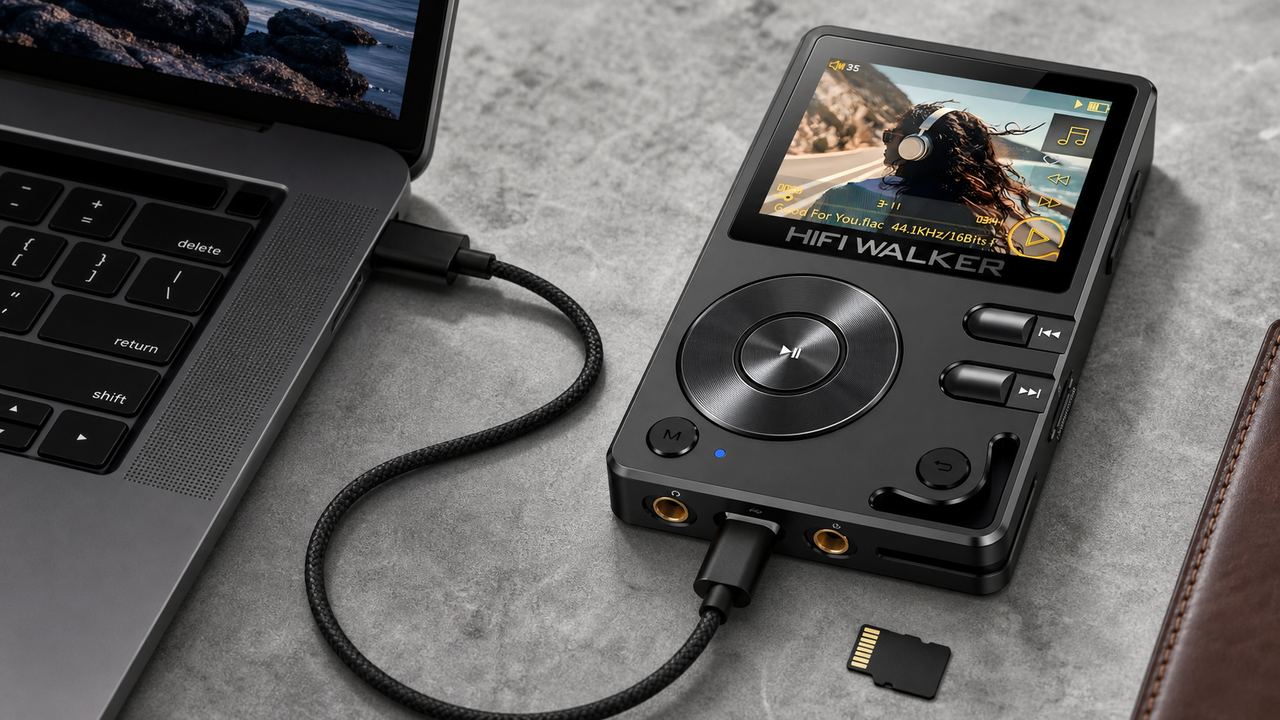
Connect via USB 3.0
Use the fastest available connection method. USB 3.0 transfers large FLAC files 10x faster than USB 2.0, crucial for extensive libraries.
Select Transfer Method
Choose between drag-and-drop for simple transfers or dedicated software like MediaMonkey for advanced library management and format conversion.
Verify File Integrity
After transfer, spot-check several files to ensure no corruption occurred and all metadata displays correctly on your device.
Update Device Database
Most players require a database refresh after adding files. This process can take 10-30 minutes for large libraries but ensures smooth navigation.
Professional music management software offers advanced features like automatic format conversion, duplicate detection, and batch metadata editing that streamline the entire process.
Format Optimization and Quality Control
Understanding audio formats directly impacts both sound quality and device compatibility. Each format serves specific purposes in the modern digital audio ecosystem.

The mp3 player download process should prioritize lossless formats whenever possible. While storage costs have plummeted, the sonic benefits of uncompressed audio remain significant on quality playback equipment.

↑ Back to Top
Back to Top ↑Advanced Library Management Techniques
Sophisticated library organization transforms the daily music discovery experience. Proper tagging, folder structures, and playlist management create intuitive navigation paths through extensive collections.
Metadata Essentials
- Complete artist and album information
- Accurate genre classifications
- Embedded album artwork (500x500px minimum)
- Track numbers and disc information
Advanced Organization
- Multi-genre tagging for crossover artists
- Custom fields for personal ratings
- Composer information for classical music
- BPM tags for workout playlists
Professional audio management requires tools beyond basic file explorers. Applications like foobar2000 and JRiver Media Center provide sophisticated tagging capabilities and batch processing functions essential for large libraries.
Establish Naming Convention
Create consistent file naming patterns like '01 - Artist - Song Title.flac' for easy sorting and identification across all devices.
Implement Folder Structure
Organize by Artist/Album/Disc structure, with separate folders for compilations, soundtracks, and classical music to maintain logical hierarchy.
Embed Complete Metadata
Ensure every file contains artist, album, year, genre, and artwork information for seamless device integration and accurate database building.
Troubleshooting Common Transfer Issues
Even experienced users encounter file transfer complications. Understanding common problems and their solutions prevents frustration and potential data loss during the music management process.
Prevention remains superior to correction. Always safely eject devices, maintain backup copies of original files, and test transfers with small batches before committing entire libraries.

Future-Proofing Your Music Collection
Building a sustainable digital music library requires forward-thinking strategies. Technology evolves rapidly, but proper planning ensures your collection remains accessible and enjoyable for years to come.

Immediate Priorities
- Backup all original files
- Maintain lossless source copies
- Document custom metadata schemes
- Test compatibility regularly
Long-term Strategies
- Invest in format-flexible hardware
- Monitor emerging audio standards
- Maintain multiple storage locations
- Update management software regularly
The music player mp3 player download ecosystem continues evolving with new formats like verified format support and emerging technologies. Choosing equipment with extensive format support, like those in the HIFI WALKER collection, provides flexibility for future developments.
Consider cloud storage integration for backup purposes, but maintain local copies for critical listening. Streaming services complement but cannot replace a carefully curated personal library optimized for your specific equipment and preferences.
Frequently Asked Questions
Q1: What's the best audio format for portable music players in 2026?
FLAC 16-bit/44.1kHz provides the perfect balance of quality and file size for most users. Audiophiles should consider 24-bit/96kHz FLAC or DSD for ultimate fidelity on compatible high-end devices.
Q2: How do I transfer music from streaming services to my music player?
Most streaming services use DRM protection that prevents direct downloads. You'll need to purchase DRM-free files from stores like HDTracks, Bandcamp, or Amazon Music, then transfer them via USB connection.
Q3: Why does my music player show 'format not supported' errors?
This typically occurs with proprietary formats (iTunes AAC with DRM) or very high-resolution files exceeding device capabilities. Convert problematic files to FLAC or MP3 using software like dBpoweramp.
Q4: How much storage do I need for a high-quality music collection?
Plan approximately 1GB per album for CD-quality FLAC files, or 2-3GB for high-resolution versions. A 1000-album collection requires 1-3TB of storage, making expandable storage crucial for serious collectors.
Q5: Can I use my existing smartphone earphones with a dedicated music player?
Yes, but dedicated music players often have different output impedances and power levels. Consider upgrading to higher-quality headphones to fully appreciate the improved audio quality these devices provide.