
Last updated: February 3, 2026 | Expert Review: HIFI WALKER Audio Lab
💡 2026 YouTube Music Strategy
- The Official Way: Use the native YouTube Music app on Android-based DAPs for legal offline downloads.
- No More Converters: Avoid low-quality, risky "YouTube to MP3" sites to protect your device and sound quality.
- High-Fidelity: G7 Series ensures bit-perfect playback for all your downloaded YouTube playlists.
Introduction: The Goal of Taking YouTube Music on the Go
You have great playlists on YouTube Music, and you want to listen to them on a dedicated MP3 player at the gym, during your commute, or on a flight. So, you find yourself asking a very common question: "how to transfer youtube music to mp3 player?"
It seems like a simple task, but the answer is more complex than you might think. While many websites promise an easy way to convert youtube into mp3 player files, there is a much safer, easier, and higher-quality method. This guide will walk you through the truth about this process and show you the best way to enjoy your music offline.
The Truth About "YouTube to MP3" Converters and Why You Should Avoid Them
The first thing you'll find when you search for a solution are third-party converter websites and software. While they seem like a quick fix, they come with serious risks:
- It's Against the Rules: Using these tools to download and convert videos often violates YouTube's Terms of Service, which prohibits downloading content without permission.
- Low Audio Quality: These services often rip audio at a very low bitrate, resulting in music that sounds flat, tinny, and lifeless.
- Security Risks: Many of these free converter sites are filled with aggressive pop-up ads and can be a source of malware or viruses for your computer.

The Official Solution: Using the YouTube Music App for Offline Playback
The only safe, legal, and high-quality way to listen to YouTube Music offline is by using the official download feature within the YouTube Music app itself. This feature is available to all YouTube Premium subscribers.
However, this brings up a new challenge: a traditional MP3 player cannot run the YouTube Music app. To use this feature, you need a modern, "smart" player that runs on the Android OS.
The Best Hardware for the Job: The HIFI WALKER G7 Series
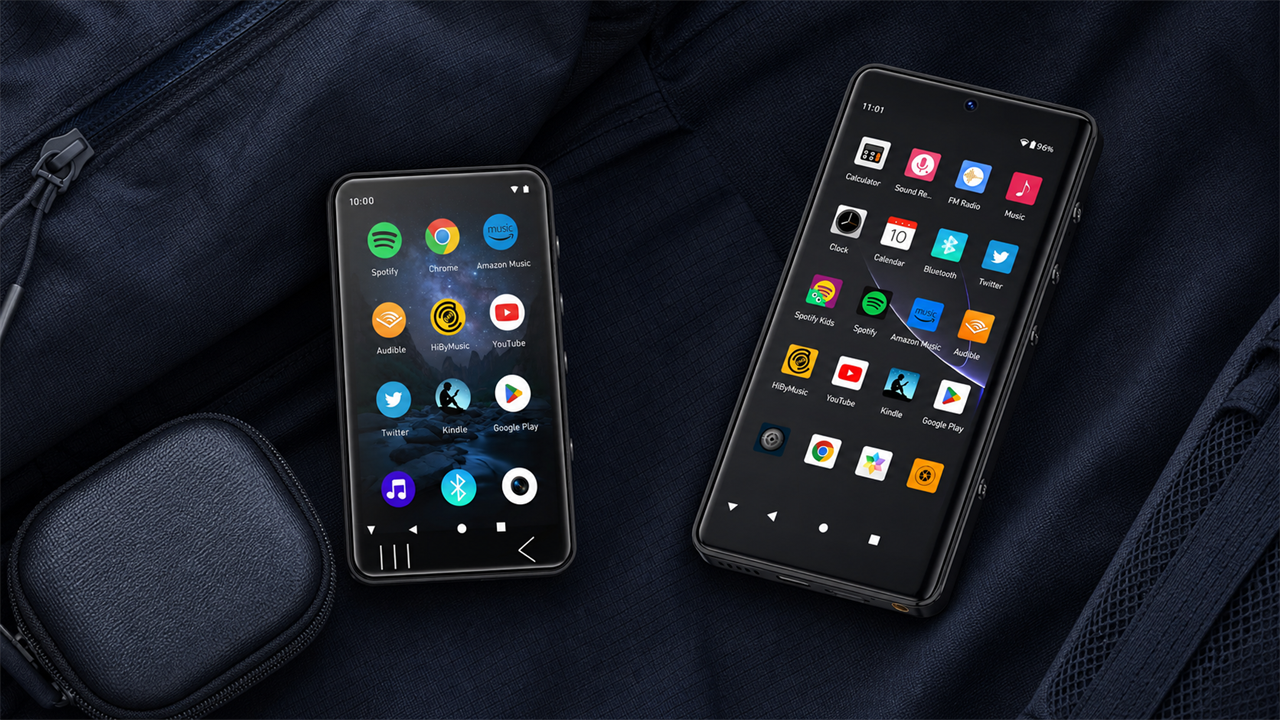
A modern Android Digital Audio Player (DAP) is the perfect hardware for this task. The HIFI WALKER G7 series offers two excellent options that can run the official YouTube Music app.
Our Top Recommendation: The HIFI WALKER G7 Pro
Our top recommendation is the HIFI WALKER G7 Pro. It is the ultimate youtube music mp3 player because it combines powerful hardware with the freedom of the Android OS.
- Run the Official App: The G7 Pro runs on Android 13, so you can install the official YouTube Music app directly from the Google Play Store and access your entire library.
- A Screen Built for Video: YouTube is a visual platform. The G7 Pro's large 5.2-inch HD screen is perfect for navigating the app and watching music videos.
- Superior Sound Quality: Its built-in Hi-Fi DAC means that even the audio from a YouTube video will sound rich, clear, and powerful.
- Massive Storage for Downloads: With expandable storage, you have plenty of space to download hours of video and audio playlists.

The G7 Pro is a complete media powerhouse. Read our in-depth look at the HIFI WALKER G7 Pro.
The High-Endurance Alternative: The HIFI WALKER G7
For listeners who prioritize maximum battery life, the HIFI WALKER G7 is an outstanding choice.
- Marathon 50-Hour Battery: Ideal for long trips where you need your audio playlists to last for days.
- Full App Support: It runs the same powerful Android OS as the G7 Pro.
- High-Fidelity Audio: Features the same professional-grade Hi-Fi DAC for clean, powerful sound.

The Risky Way vs. The Smart Way: A Comparison
| Feature | The Risky Way (Converters) | The Smart Way (G7 Pro/G7) |
|---|---|---|
| Legality | Violates YouTube's Terms. | 100% Legal and Official. |
| Audio Quality | Poor (Low bitrate). | Excellent (High-quality AAC). |
| Security | High risk of malware. | Completely Safe. |
| Convenience | Manual, song-by-song. | Easy one-tap downloads. |
| Video Playback | Not possible. | Yes, on an HD screen. |
How to Officially Download YouTube Music to Your Player
Here is the simple, official process for getting your music onto a device like the G7 Pro:
- Connect to Wi-Fi: Power on your G7 Pro and connect to your local Wi-Fi.
- Install the App: Open the Google Play Store and download the official "YouTube Music" app.
- Sign In: Open the app and sign in with your YouTube Premium account.
- Download: Find any playlist, album, or song, tap the three-dots menu, and select "Download."

Conclusion: A Better Way to Enjoy Your Music Offline
While the dream of a simple youtube to mp3 player file transfer is tempting, the reality is that it's a risky, low-quality process. The best, safest, and most enjoyable way to take your favorite YouTube Music content on the go is with a modern Android player.
A device like the HIFI WALKER G7 or G7 Pro not only gives you official offline access but also elevates the entire experience with superior sound and video quality.
Ready to upgrade your on-the-go listening? Explore our full collection of Android Music Players.
Upgrade Your YouTube Music Experience
Discover the Flagship G7 Pro or the versatile G7 Android Player.
Frequently Asked Questions (FAQ)
1. Do I absolutely need YouTube Premium for offline listening?
Yes. Just like with Spotify, the official offline download feature is a key benefit of the YouTube Premium subscription.
2. Is the audio quality of YouTube Music's downloads good?
Yes. When you download a song through the official app, it saves it in a high-quality AAC format (up to 250 kbps), which sounds significantly better than the low-quality files from converter websites.
3. What's the difference between this and just using my phone?
A dedicated player like the G7 Pro offers much better sound quality from its Hi-Fi DAC, has a far longer battery life, and gives you a distraction-free experience.
4. How many songs or videos can I store?
With a 128GB microSD card in the G7 Pro, you can store thousands of songs or many hours of HD music videos.
5. Is the G7 Pro difficult to use?
Not at all. If you know how to use an Android smartphone, you will find the G7 Pro's interface very familiar and easy to navigate.