



Can You Listen to Spotify Without Your Phone?
Want to enjoy Spotify without reaching for your phone every time? Planning a laid-back afternoon outside with your phone left at home? How about taking a walk or stepping away from your desk with nothing to do but listen? A dedicated music player that runs Spotify lets you enjoy the app without using your phone as the music source.
Picture yourself settling in with a book. You start an album and leave your phone on the kitchen counter. When you're ready for another song, you reach for the player beside your chair. Your phone stays put, and changing the music doesn't turn into checking messages or scrolling through another app.
This guide walks you through choosing a Spotify player you can use without a phone: what makes it convenient, where it fits into your day, and how to get ready before leaving your usual Wi-Fi connection. The idea is simple: give yourself a little time that's just for the music.
Where a separate player fits into your day
Give your reading time a soundtrack. Some books call for soft instrumentals; others feel right with an old favorite playing quietly in the background. Set the G7 Pro beside your book, put on your headphones, and choose something that suits the mood. Let the music be part of what makes you look forward to opening the next chapter.
You don't need a special listening room or an elaborate setup. A comfortable chair, a small table, and music you enjoy can turn an ordinary evening into a little time you've kept for yourself.
Give your desk a music companion. Your workday may call for a different kind of listening: a familiar playlist while you settle into a task, something livelier after lunch, or a favorite album during a break. Keep the player beside your notebook so music has a place among the things you use throughout the day.
If you're considering a Spotify player without a phone, start with the routine you already have. Would you reach for it most evenings with a book, or keep it beside your laptop during the workday? Having a clear answer gives the G7 Pro a purpose before it even arrives.
A device to listen to Spotify without a phone can fit either routine. Choose the moment you'd use it most, then picture the music you'd want ready when you sit down. Keep the choice personal and simple.

What makes the G7 Pro a good fit for Spotify?
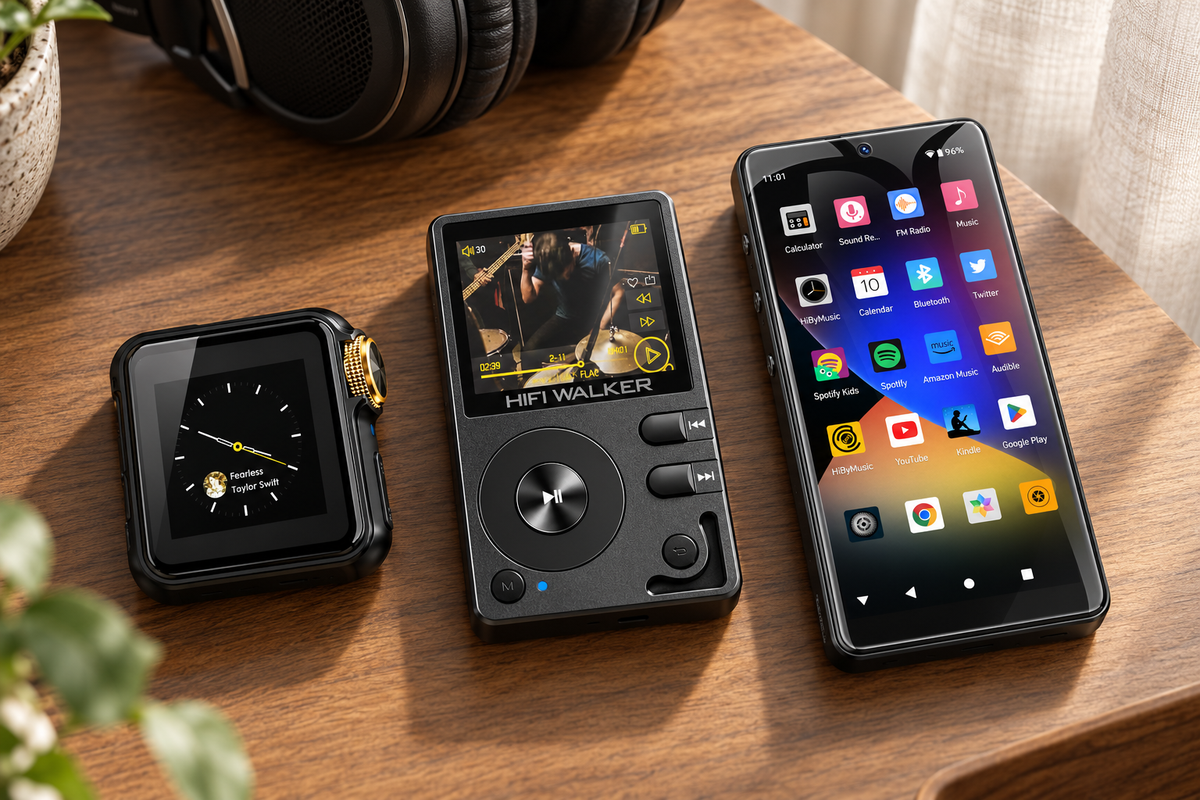
Spotify runs right on the player. The G7 Pro supports Spotify and comes with Google Play preinstalled. Open the app, choose an album or playlist, and control playback on the player itself. Your phone doesn't have to be the music source, and you don't have to pick it up whenever you want to change what you're hearing.
You can keep using the service you enjoy while giving it a device of its own. That matters when you like browsing your music in an app and want more than a few playback buttons. The G7 Pro's Android interface gives you an on-screen place to choose what comes next, whether you're starting a full album or finding something for the mood you're in.
A 5.2-inch touchscreen makes choosing music convenient. Some days you know exactly which playlist you want. Other days you want to look through a few albums before settling on one. Having a screen on the player puts those choices in front of you, right where you're listening, instead of sending you back to your phone.
Consider how much of your listening starts with browsing. If you enjoy looking through album artwork and track lists, a touchscreen is something you'll use, not just a specification on the box. On a desk or side table, it also gives the player a natural spot: close enough to see, easy to reach, and ready when you want to choose another record.
Use wired or Bluetooth headphones. The G7 Pro offers Bluetooth 5.0 and a 3.5 mm wired connection. Pair suitable wireless headphones when you'd rather leave the cable out of your setup, or plug in compatible wired headphones if that's what you enjoy using. Either way, you can build the listening space around your preferences instead of starting over with different headphones.
Which tasks can move from your phone to the player? Think about the little interruptions between songs: finding where you left your phone, taking it out of your bag, or opening the app again to choose something different. Choosing the G7 Pro as a Spotify player without a phone puts those everyday music tasks on a separate device. Your next album doesn't have to begin with a search for your phone.
Start with a playlist, pause when someone speaks to you, skip a track that doesn't suit your mood, then browse for the next album on the same device. You're still choosing the music yourself; you simply have a separate place to do it. If these are the reasons you usually reach for your phone, that everyday convenience is something to weigh when deciding whether to buy.
Start with the parts of the experience you care about most: opening your music, seeing what you want to play, and listening comfortably. Together, the app, screen, and headphone options give you a practical way to do those things on one player. You don't need to sort through every hardware detail to picture how you'd use it.


Plan for the places you'll listen
Where will you listen most often? At home or near a familiar Wi-Fi connection, you can use the G7 Pro for connected Spotify listening. If you're heading somewhere without a network, you'll want your music ready before you go. Thinking about those places makes it easier to choose around your day, rather than buying on the word portable alone.
At home, focus on keeping music within reach. With usable Wi-Fi, you can decide what to hear as you go instead of choosing everything before you sit down. If you often change your mind halfway through an album, the appeal is having Spotify close at hand on its own screen. Ask whether you want a separate place to browse and control music, even when your phone is only in another room.
For outings, focus on leaving the phone behind. To listen to Spotify without your phone away from Wi-Fi, think about whether you're happy choosing music in advance. An album or playlist prepared for offline playback can suit a planned walk; finding an unheard track on demand still needs internet access. The buying question is whether you want familiar music ready to go or expect to explore the catalog throughout the outing. Choose around that habit, then use the preparation steps below to get ready.
Remember the time between connected places, too. A commute might include a train ride, a walk, or a wait for the bus. Having Wi-Fi at home and at work doesn't mean you'll have it all the way there. Think about whether music during that stretch is part of your everyday plan or just something you'd like occasionally.
Before ordering, jot down where you usually listen and whether you like discovering new music or playing an album you've already chosen. That gives you something useful to discuss with customer support. A reading chair with home Wi-Fi and a walk with your phone left behind need different preparation. If you plan to use workplace or public Wi-Fi, check how you sign in before counting on it.
For time away from Wi-Fi, prepare eligible downloads in the official app. The G7 Pro product page describes offline downloads through services that support them. Pick what you'd like to hear while you're still connected, so you can spend the break listening instead of trying to get your music ready at the last minute.
For music downloads, Spotify requires Premium; the free version allows podcast downloads. You'll also need to go online at least once every 30 days to keep your downloads. Those are Spotify's service requirements, rather than something that comes with purchasing the player. Its official offline listening guide has the current details.
Pick your music while you're connected
Open Spotify on the player using available Wi-Fi. Choose the albums or playlists you'd like for your outing, then use the app's download option if your subscription includes it.
Wait for your downloads to finish
Look for the app's download status. Saving an album to your library doesn't necessarily download it, so make sure the music is ready before leaving Wi-Fi.
Try your music before you head out
Disconnect from Wi-Fi and make sure your downloaded selections play. Connect your headphones and choose a comfortable volume before putting the player in your bag.
Keep the preparation manageable. You may only need a favorite album or a playlist that fits the time you'll be away. There's no need to organize your entire library before a short walk. When you're connected again, you can browse for something new. A small selection you'll be happy to hear is often enough to get started.
↑ Back to Top
Back to Top ↑Put together a setup you'll enjoy using
Start with headphones you already like wearing. With wired headphones, place the player where the cable can reach comfortably. Beside a reading chair, that might be the side table. At a desk, leave enough slack to reach for the touchscreen without dragging the cable across your notebook. Small adjustments like that help the setup feel comfortable from the start.
If you prefer wireless headphones, pair them with the player and use the controls your headphones support. Keep the G7 Pro nearby for browsing albums and playlists. It's a convenient arrangement when you want the player on a table but would rather have no cable running from the table to your chair.
Find a spot you'll naturally reach for when it's time for music. A player tucked in a drawer is easy to forget; one beside your headphones is ready when you are. You don't need to create a whole new routine around it. Set it near the place you already enjoy reading, working, or taking a quiet break.
When you're taking the player out, decide how often you'll want to use the screen. You might choose an album before putting it in your bag, or keep it somewhere easy to reach if you like changing music along the way. Think about where it will fit alongside the things you normally carry and how you'll reach the controls.
Give the player a familiar charging spot so it's ready for your next listening session. The G7 Pro has its own battery, which means your phone doesn't have to handle music playback while you're using it. You'll have another device to charge, but you'll also have a place for music that doesn't rely on keeping your main phone in your hand.
Is the G7 Pro right for you?
Consider the G7 Pro if you enjoy Spotify but want music on a device of its own. Perhaps you're tired of picking up your phone for every song change, or you'd like to leave it elsewhere while you read. A player makes the most sense when it helps with something you regularly want to do.
That could mean an album beside your chair, a playlist while you work, or music you've prepared for a break away from Wi-Fi. You don't have to use the player the same way every day. Start with the moment that matters most to you and decide whether having music close and your phone elsewhere would make it more enjoyable.
If you'd like to compare broader device categories, see the portable Spotify player guide. To decide whether the G7 Pro belongs in your own day, picture where you'd keep it, what you'd listen to first, and when you'd reach for it. That's a useful place to start.
Choose a moment that's just for music
Think of a part of your day when you'd enjoy having your phone out of reach.
See whether the G7 Pro fits the listening time you're looking forward to.
Frequently Asked Questions
Q1: Do I need to copy Spotify music from my computer?
No. For the listening described here, use Spotify directly on the G7 Pro. You don't need to copy audio files from a computer. Prepare any eligible downloads in the official app.
Q2: Can someone change the music without taking my phone?
Yes. You can hand over the G7 Pro instead of your main phone because the music controls are on the player. Remember that whoever uses it may be able to access the account signed in on that device.
Q3: Does the G7 Pro only play Spotify?
No. It's an Android player with Google Play and Spotify support, rather than a device locked to Spotify. This guide focuses on giving your Spotify listening a place away from your main phone.