
Last updated: July 8, 2026
Expert Insights: SPDIF in 2026
- SPDIF's 6.144 Mbps bandwidth handles 24-bit/192kHz stereo PCM comfortably — the format only becomes a bottleneck if you're working with DSD or multi-channel uncompressed audio, which represent a small fraction of real-world music libraries.
- In electrically noisy environments (living rooms with multiple switched-mode power supplies), optical SPDIF consistently outperforms coaxial because it eliminates the shared ground reference that causes hum. The jitter advantage of coaxial is usually inaudible unless you're using high-resolution jitter analysis equipment.
- The most overlooked SPDIF optimization is sample rate matching. Many audiophiles blame cable quality for dropouts that are actually caused by a 192kHz source signal hitting a DAC with a 96kHz ceiling — always check your DAC's supported sample rates before selecting a playback resolution.
What Is an SPDIF Port? The Definitive 2026 Answer
An SPDIF port (Sony/Philips Digital Interface Format) is a standardized digital audio connection that transmits uncompressed PCM or compressed surround-sound signals between devices — completely bypassing the signal degradation that analog wiring introduces. If you own a Hi-Res audio player, a desktop DAC, or an AV receiver, there is a good chance an SPDIF port is already sitting on its back panel waiting to be used.
Originally co-developed by Sony and Philips in the 1980s, SPDIF remains the most universally compatible digital audio standard in 2026 — found on everything from budget soundbars to flagship DAPs. Understanding what an SPDIF port does, and when to use it, is fundamental to building a truly high-fidelity audio chain.
Why Analog Connections Fall Short
- Signal degrades over cable length
- Susceptible to electromagnetic interference
- Each conversion stage reduces quality
- Ground loops introduce audible hum
SPDIF Port Advantages
- Pure bit-perfect digital transmission
- Complete electrical isolation (optical)
- Supports multi-channel compressed formats
- Universal cross-manufacturer compatibility

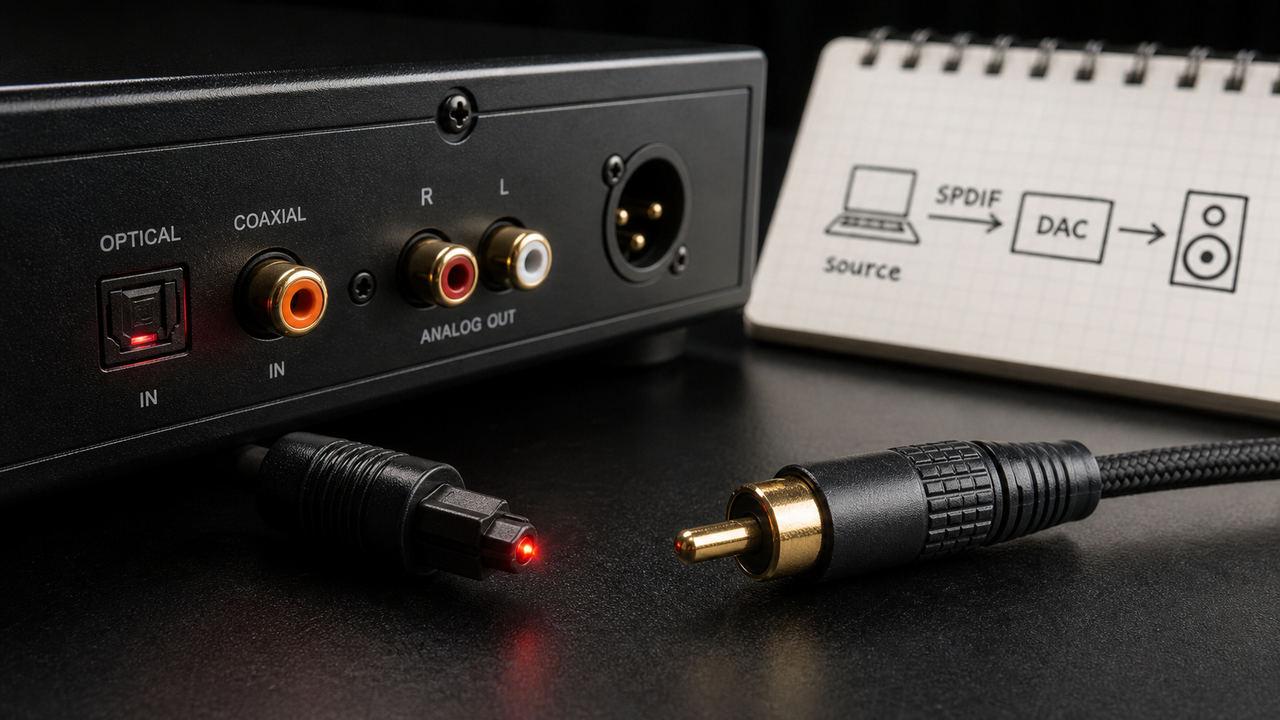
Close-up of a TOSLINK optical SPDIF port — the red glow confirms the fiber optic transmitter is active.
The core promise of an SPDIF port is simple: your music arrives at its destination exactly as it was encoded. No conversion artifacts, no noise floor degradation from a cheap op-amp, no hum from a ground loop. For audiophiles who pair a portable DAP with a desktop DAC, SPDIF is often the cleanest path available short of USB Audio Class 2.0.
- ►1. What Is an SPDIF Port? The Definitive 2026 Answer
- ►2. Optical vs Coaxial SPDIF: Which Connection Should You Use?
- ►3. SPDIF Technical Specifications: What 24-bit/192kHz Really Means
- ►4. How to Set Up an SPDIF Connection: Step-by-Step
- ►5. Real-World SPDIF Applications: From DAPs to Home Theater
- ►6. Choosing the Right DAP with SPDIF Output: 2026 Recommendations
- ►7. Troubleshooting SPDIF Port Problems: A Diagnostic Checklist
- ►8. SPDIF in 2026: Still Relevant Alongside USB Audio and HDMI eARC?
Optical vs Coaxial SPDIF: Which Connection Should You Use?
SPDIF exists in two physical forms — optical (TOSLINK) and coaxial RCA — and the choice between them genuinely affects sound quality in certain environments. Both carry identical digital data, but the transmission medium creates real-world differences that audiophiles debate passionately.
Optical SPDIF shines in living rooms and home theaters where other electronics can pollute the ground plane. The complete galvanic isolation eliminates ground loops entirely — a common cause of the infamous 60Hz hum in analog-connected systems. Use optical if your DAC sits near a PC, TV, or power amplifier.
Coaxial SPDIF is preferred by many recording engineers and dedicated two-channel audiophiles. The copper cable avoids the light-to-electrical conversion step that can introduce jitter in optical systems, potentially yielding a more precise clock signal in an already-clean electrical environment. Always use a proper 75-ohm coaxial cable — not a generic composite video RCA — to maintain signal integrity.

Left: TOSLINK fiber optic cable with its distinctive square connector. Right: 75-ohm coaxial RCA cable for digital audio — visually identical to analog RCA but electrically different.
SPDIF Technical Specifications: What 24-bit/192kHz Really Means
Knowing the exact technical limits of an SPDIF port prevents costly compatibility mistakes. The format operates at a maximum data rate of approximately 6.144 Mbps, which comfortably covers most Hi-Res audio content but creates hard limits for ultra-high-resolution formats like DSD256.
Sample Rate Support: Up to 192kHz
Standard SPDIF handles 44.1kHz (CD), 48kHz (digital video), 88.2kHz, 96kHz, 176.4kHz, and 192kHz. Virtually every Hi-Res FLAC, WAV, or ALAC file you'll encounter fits within this range.
Bit Depth: Up to 24-bit
24-bit audio delivers up to 144dB of theoretical dynamic range versus 96dB for 16-bit CD. SPDIF fully supports 24-bit, making it Hi-Res audio capable by any industry definition.
Multi-Channel: Compressed Formats Only
SPDIF can carry Dolby Digital (AC-3) and DTS bitstreams in their compressed form, enabling 5.1 and 7.1 surround sound via AV receivers. Uncompressed multi-channel PCM, however, requires HDMI.
DSD and MQA: Not Supported Natively
DSD64/128/256 and MQA cannot be transmitted natively over SPDIF. For DSD playback, use USB Audio Class 2.0 or the device's built-in DAC. Some players can convert DSD to PCM before SPDIF output.

Signal flow from a Hi-Res source through an SPDIF port into an external DAC — the digital handoff preserves bit-perfect accuracy until the final D/A conversion stage.
Formats SPDIF Supports
- PCM up to 24-bit/192kHz
- Dolby Digital (AC-3) 5.1
- DTS surround sound
- FLAC, WAV, ALAC (decoded to PCM)
- Standard Hi-Res audio files
Formats SPDIF Cannot Carry
- DSD64/128/256 (native)
- MQA full unfolding
- Uncompressed multi-channel PCM
- Dolby Atmos / DTS:X (object-based)
- 32-bit float audio
How to Set Up an SPDIF Connection: Step-by-Step
A correctly configured SPDIF port connection takes under five minutes and delivers bit-perfect audio to your external DAC or AV receiver. The most common failure points are not in the hardware — they're in the software settings that most users never check.
Choose Your Cable Type
Select optical (TOSLINK) if you want complete electrical isolation or if your equipment is near other electronics. Choose 75-ohm coaxial RCA if you prioritize potential jitter advantages in a clean environment. Never use a standard analog RCA cable for coaxial SPDIF.
Enable Digital Output on the Source
On a DAP or audio player, navigate to Settings → Audio Output → Digital Out or SPDIF Output. Some devices default to analog output and require manual switching. Confirm the output is set to PCM (not passthrough) for Hi-Res files.
Select the Correct Input on the Receiver
On your DAC, amplifier, or AV receiver, select the SPDIF/Optical/Coaxial input corresponding to where you plugged the cable. Many devices have multiple SPDIF inputs labeled Optical 1, Optical 2, Coaxial 1, etc.
Match Sample Rates
Check that your receiving DAC supports the sample rate being transmitted. If your player outputs 192kHz but your DAC maxes out at 96kHz, you may get silence or dropouts. Set the player to a compatible rate or enable automatic sample rate conversion if available.
Verify with a Reference Track
Play a familiar Hi-Res reference track — a 24-bit/96kHz FLAC you know well. Check that the DAC's sample rate display confirms the expected rate and listen for any distortion, dropouts, or hum that would indicate a configuration issue.
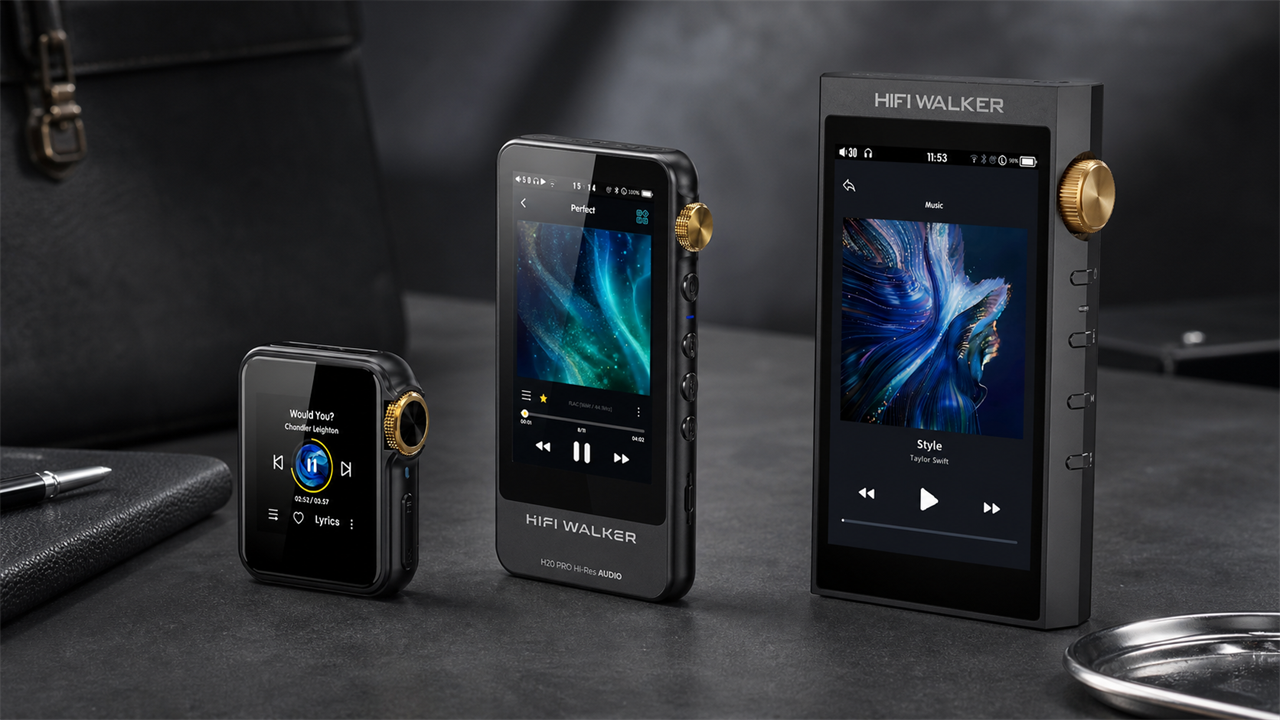
When connecting HIFI WALKER Hi-Res audio players to a desktop DAC via SPDIF, the H20 Ultra and H20 Pro both feature dedicated digital output modes accessible in their system settings. Always verify the output format before your first listening session to ensure you're receiving the full 24-bit resolution.

The HIFI WALKER H20 Ultra — a flagship Hi-Res DAP with digital output for SPDIF-based desktop system integration.
Real-World SPDIF Applications: From DAPs to Home Theater
The SPDIF port earns its keep across a surprisingly wide range of audio scenarios in 2026. Whether you're routing a portable player through a reference-grade desktop DAC or feeding compressed Dolby Digital to an AV receiver, SPDIF remains the connective tissue of modern Hi-Fi systems.
Home Audiophile Uses
- DAP → external DAC → headphone amplifier
- Linking CD transports to separate DACs
- Bypassing inferior internal DAC circuits
- Integrating streaming devices into two-channel systems
- Multi-room audio signal distribution
Home Theater & Pro Uses
- Streaming box → AV receiver (Dolby Digital/DTS)
- Game console digital audio output
- Studio monitor digital inputs
- Digital mixing console connections
- Broadcast equipment audio interfaces
The most compelling use case for audiophiles is bypassing a device's internal DAC. Even premium DAPs include DAC circuitry that, while excellent, may be outclassed by a dedicated desktop unit like a high-end ESS Sabre-based converter. The SPDIF port lets you use your player purely as a transport, handing off the D/A conversion to the best hardware in your chain.

A complete audiophile desktop chain: DAP → SPDIF optical → desktop DAC → balanced headphone amplifier.
Home theater systems rely on SPDIF to carry compressed multi-channel audio from Blu-ray players, streaming sticks, and set-top boxes to AV receivers. For stereo music listening, SPDIF's bit-perfect PCM transmission means your 24-bit/96kHz files reach the DAC without any lossy processing — a significant audible improvement over HDMI audio extraction in many receiver implementations.
↑ Back to Top
Back to Top ↑Choosing the Right DAP with SPDIF Output: 2026 Recommendations
Not every portable audio player includes a dedicated SPDIF output. When building a system that routes a DAP into a desktop DAC, SPDIF support is a critical spec to verify before purchase. Below is a practical overview of device categories and their typical SPDIF capabilities in 2026.
Among current HIFI WALKER players, the flagship H20 Ultra and the H20 Pro represent the clearest path to SPDIF-enabled portable audio. Both players are designed for users who demand the flexibility to use an external DAC — whether at home or in a dedicated listening room.

The HIFI WALKER H20 Pro — a portable Hi-Res player with digital output capability for SPDIF system integration.
When evaluating any DAP for SPDIF use, verify three things: the maximum output sample rate over digital (some cap at 96kHz even when the internal DAC handles 192kHz), whether the optical output uses a standard TOSLINK socket or a 3.5mm mini-optical adapter, and whether the device supports bit-perfect bypass of its internal volume control during digital output.
Troubleshooting SPDIF Port Problems: A Diagnostic Checklist
Even a correctly wired SPDIF port can fall silent or produce distorted audio due to configuration errors, cable faults, or format mismatches. Work through this diagnostic checklist systematically before assuming hardware failure — the vast majority of SPDIF issues are software or cable-related.
No Audio: Check Digital Output Mode
The most common cause is that the source device still outputs to its analog jack. Navigate to the player's audio settings and confirm SPDIF/Digital Output is enabled. For optical connections, look for a faint red glow inside the TOSLINK port — no light means the transmitter is off or the port is disabled.
Audio Dropouts: Diagnose Sample Rate Mismatch
Intermittent dropouts almost always indicate a sample rate mismatch. If your DAP is sending 192kHz but your DAC only accepts up to 96kHz, the DAC will either mute or drop frames. Set both devices to a mutually supported rate (96kHz is nearly universal) and test again.
Distortion or Hum: Rule Out Ground Loops
Audible hum through a coaxial SPDIF connection usually points to a ground loop caused by multiple devices sharing a common electrical ground at different potentials. Switch to optical SPDIF to eliminate the electrical ground entirely, or use a ground loop isolator on the coaxial line.
Format Not Recognized: Verify Compatibility
Some older DACs can't decode higher sample rates or bitstreams. If your DAC's display shows 'Unlock' or no lock indicator, reduce the source sample rate to 48kHz/16-bit and step up incrementally. Also confirm you're not accidentally sending a DSD or passthrough bitstream to a DAC that expects PCM.
Prevention Best Practices
- Use proper 75-ohm cables for coaxial SPDIF
- Keep optical cables free of sharp bends
- Clean RCA contacts with contact cleaner annually
- Keep cable runs under 5m where possible
- Match sample rates before connecting devices
Quick Diagnostic Fixes
- Swap to optical if coaxial has hum issues
- Reduce sample rate to 44.1kHz to test lock
- Try a different SPDIF cable as first step
- Power cycle both devices after changing settings
- Check for firmware updates on source and DAC

A methodical diagnostic approach to SPDIF issues: isolate each component of the chain to identify the failure point.
SPDIF in 2026: Still Relevant Alongside USB Audio and HDMI eARC?
With USB Audio Class 2.0 supporting DSD256 and 32-bit/768kHz PCM, and HDMI eARC enabling lossless Dolby Atmos, it is fair to ask whether the SPDIF port is still worth caring about in 2026. The honest answer is: yes, emphatically — for two-channel Hi-Res audio up to 24-bit/192kHz, SPDIF remains a practical, reliable, and universally supported standard.
Where SPDIF Still Excels
- Universal compatibility across device generations
- Simplest possible digital connection (plug and play)
- Perfectly adequate bandwidth for 24-bit/192kHz PCM
- Cost-effective — no drivers, no USB host required
- Ideal for DAP-to-DAC desktop integration
When to Use a Newer Standard
- DSD64/128/256 native playback → USB Audio 2.0
- Lossless Dolby Atmos/DTS:X → HDMI eARC
- Ultra-high-res 32-bit/768kHz → USB Audio 2.0
- Network audio streaming → Ethernet/Wi-Fi protocols
- Wireless Hi-Res (LDAC/aptX HD) → Bluetooth 5.0+
The bandwidth ceiling of SPDIF (~6.144 Mbps) becomes a constraint only when you venture beyond 24-bit/192kHz stereo PCM. For the overwhelming majority of Hi-Res music libraries — stored as FLAC files at 24-bit/96kHz or 24-bit/192kHz — SPDIF transmits every bit faithfully. The format's simplicity is itself a virtue: no driver installation, no USB enumeration issues, no audio interface conflicts.
For audiophiles building or upgrading a desktop system in 2026, the practical recommendation is to keep SPDIF as your primary digital connection for two-channel PCM playback from a DAP, while adding USB Audio for DSD files. Explore our DAP guides and tips for detailed advice on maximizing digital output quality from portable players.

A modern audio system in 2026 typically combines SPDIF for standard Hi-Res PCM, USB Audio for DSD, and HDMI eARC for home theater — each standard playing to its strengths.

Frequently Asked Questions
Q1: What is an SPDIF port used for?
An SPDIF port transmits digital audio signals between devices — for example, from a Hi-Res DAP to an external DAC or from a streaming device to an AV receiver. It preserves the digital signal bit-perfectly, bypassing the source device's internal analog stage and eliminating noise introduced by analog wiring.
Q2: What is the difference between optical and coaxial SPDIF?
Optical SPDIF (TOSLINK) uses fiber optic cables and transmits light pulses, providing complete electrical isolation that eliminates ground loops and EMI. Coaxial SPDIF uses a 75-ohm RCA cable and transmits an electrical signal — it may offer slightly lower jitter in clean environments but is susceptible to ground loops. Both support the same maximum resolution: 24-bit/192kHz PCM.
Q3: Does SPDIF support high-resolution audio?
Yes. SPDIF fully supports Hi-Res audio up to 24-bit/192kHz PCM — the standard definition of Hi-Res audio. It cannot natively transmit DSD (DSD64/128/256) or MQA, which require USB Audio Class 2.0 or proprietary protocols. For the majority of Hi-Res FLAC and WAV libraries, SPDIF handles everything without limitation.
Q4: Why is there no sound through my SPDIF connection?
The most common causes are: (1) digital output not enabled on the source device — check audio settings and look for a red glow in the TOSLINK port; (2) wrong input selected on the receiver; (3) sample rate mismatch between source and DAC. Try setting both devices to 48kHz/16-bit as a baseline test, then step up to higher resolutions once the connection is confirmed.
Q5: Can I use a regular RCA cable for coaxial SPDIF?
Technically yes, but it is not recommended. Coaxial SPDIF requires a 75-ohm impedance cable. Standard analog RCA cables are typically 50-ohm, which causes impedance mismatch, signal reflections, and increased jitter — especially over longer runs. Use a cable specifically rated for 75-ohm digital coaxial audio for reliable performance.
Q6: Which HIFI WALKER players have SPDIF output?
The HIFI WALKER H20 Ultra ($1,882) and H20 Pro ($1,506) are designed for audiophiles who need high-quality digital output for external DAC integration. Always verify the current digital output specifications on the product page, as capabilities can vary by firmware version. Visit hifiwalker.com for the latest model specifications.