



Which Modern iPod Should You Buy?
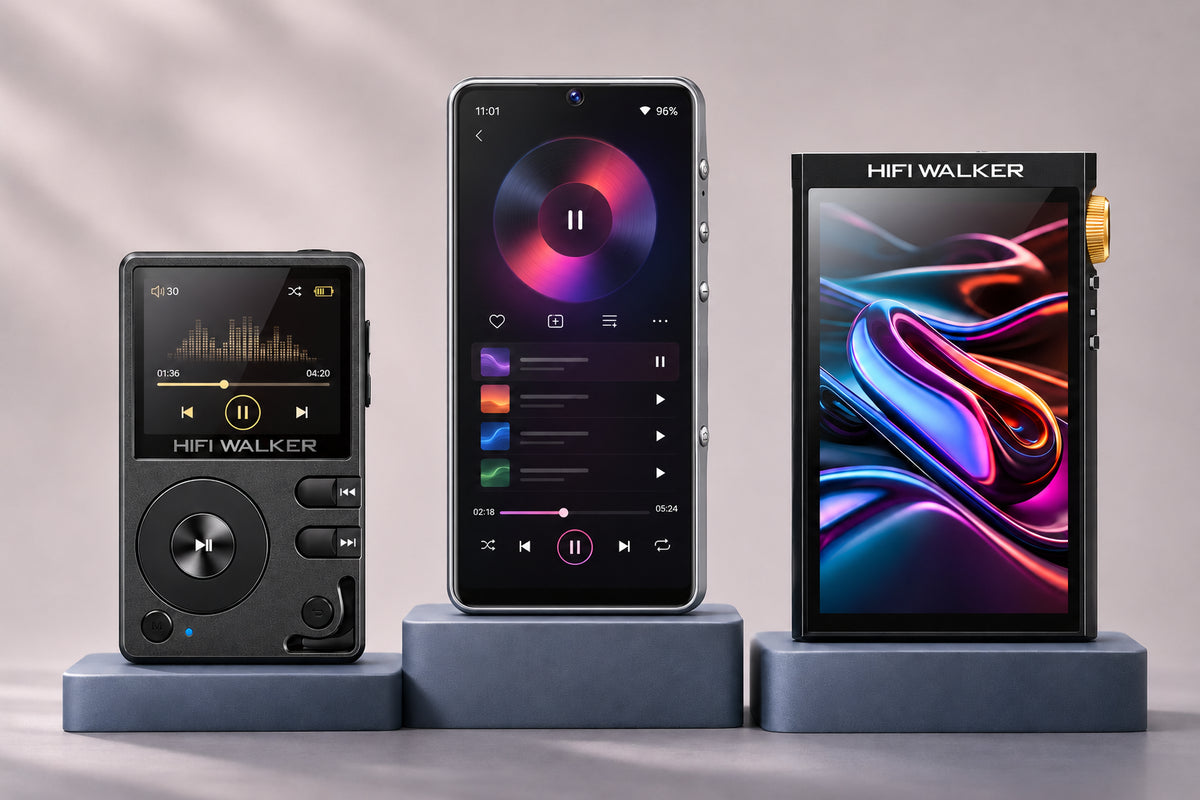
Choose HIFI WALKER H20 Pro for touchscreen album browsing and physical playback controls, H2 Mini for a small clip-on player, or G7 Pro for music apps. Want a modern iPod for a saved collection with button-based navigation? Choose H2. Want a larger touchscreen and a premium aluminum-and-glass build? Choose H20 Ultra. These five iPod-like players cover different ways of listening, so the best match starts with the controls and music you want to use.
If your search began with an iPod Shuffle, Nano, Classic or Touch, use that name as a starting point. Small size points toward H2 Mini; a local collection and physical operation point toward H2; touchscreen browsing leads to H20 Pro or H20 Ultra; apps lead to G7 Pro. These are HIFI WALKER products with their own interfaces, rather than Apple devices or replicas of the Click Wheel.
The practical difference is what happens when you want the next album. Some listeners want buttons and a small screen; others want a larger display for browsing. If you are comparing music players like iPod models you used before, keep the familiar priority and choose the current hardware that delivers it.
Expert Insights: Key Takeaways
- H20 Pro is the main touchscreen choice for a local album collection; H2 Mini is the compact clip-on option.
- H2 gives physical operation, while H20 Ultra adds a larger local-file display and premium construction.
- Choose G7 Pro for Spotify, Tidal and Audible apps on Android.
- ►1. Which Modern iPod Should You Buy?
- ►2. Five iPod-Like Players Compared
- ►3. From iPod Shuffle or Nano to H2 Mini
- ►4. From iPod Classic to H2: Physical Controls and Your Collection
- ►5. H20 Pro: The Modern iPod for Touchscreen Album Browsing
- ►6. H20 Ultra: A Larger Screen and Premium Construction
- ►7. From iPod Touch to G7 Pro: Choose the App Route
- ►8. Local Files or Music Apps? Make One Clear Choice
- ►9. Bring Your Existing Music Along
- ►10. Your Five-Player Shortlist
Five iPod-Like Players Compared
Use the first two columns to find your route, then compare the screen and connections. H2 Mini, H2, H20 Pro and H20 Ultra play compatible local files from a memory card. G7 Pro runs Android and supports the music apps described below. A removable card and built-in device storage are separate things.
For most readers who want touch navigation for their own albums, H20 Pro is the first model to inspect. It combines browsing space with separate controls in a narrower body than the larger H20 Ultra. H2 and H2 Mini answer different priorities: physical operation and smaller carry size. G7 Pro earns its place through apps, rather than by competing on the same audio-hardware specifications.

From iPod Shuffle or Nano to H2 Mini
Choose HIFI WALKER H2 Mini when the attraction of a modern iPod is how little space it takes up. H2 Mini measures 52 × 46 × 15.6mm and weighs 42g without its back clip. That makes it the smallest body in this five-player comparison. The clip gives you a different carrying option from a larger touchscreen player, while its display lets you see what you are selecting.
An iPod Shuffle alternative often appeals to someone who wants a compact player they can attach to clothing. An iPod Nano alternative may be about small size plus a screen. H2 Mini addresses those priorities with its own design. Nano generations used different controls, so match the feature you miss instead of expecting every Nano owner to want the same replacement.
The H2 Mini's 1.54-inch display is for checking and choosing music in a compact format. Its ESS9218PC audio chip, 3.5mm output and Bluetooth support give you wired and wireless listening options. Choose it because you want a small device for a prepared local collection, particularly when a larger screen would add more bulk than you want to carry.

For a short walk or a commute, decide how much music you actually want ready at once. A few favorite albums can make a small player easier to browse than a poorly organized copy of everything. H2 Mini is the right choice when a compact carry format is the priority; the larger models below give you more screen space.
From iPod Classic to H2: Physical Controls and Your Collection
Choose HIFI WALKER H2 if your iPod Classic search is really about carrying an album collection and using physical controls. H2 puts a 2.0-inch screen in a 90 × 55 × 15mm body and weighs 152g. It is a more substantial device than H2 Mini, with a control layout you can inspect directly on the product page.
The H2 separates a dedicated DAC, ES9018K2M, from its MAX97220A amplifier. It also supports USB DAC use, so the player can take a second role with a compatible computer setup. Those are concrete reasons to choose H2 beyond simply wanting an old-fashioned-looking player: a local music library, physical operation and an additional audio connection route.
This is the straightforward recommendation when you prefer buttons to touch navigation and do not need a 4.4mm balanced connection. Its 3.5mm output serves the wired route, and two-way Bluetooth adds sending and receiving options. Choose H20 Pro instead if browsing on a touchscreen is part of the appeal; choose H2 Mini when reducing carry size matters more.
The dedicated iPod Classic alternative guide provides another look at compact replacement options. In this five-model comparison, H2's role is clear: physical controls and a saved collection, with its own interface rather than an Apple synchronization system.
H20 Pro: The Modern iPod for Touchscreen Album Browsing
Choose HIFI WALKER H20 Pro when you want to select albums on a touchscreen but keep separate controls for playback. H20 Pro combines a 3.2-inch touchscreen with a physical volume knob in a 108.5 × 53 × 14mm body. That combination makes it the main touch-focused local-file recommendation here.
The H20 Pro uses two ES9219PC DAC chips and provides both 3.5mm and 4.4mm balanced outputs. It gives you a choice of wired connection as well as touchscreen browsing. A compatible balanced cable uses the balanced output; a normal 3.5mm headphone plug uses the 3.5mm output. Choose the connection your equipment is designed for.
The appeal is the complete control arrangement, rather than the screen alone. Browsing and everyday playback involve different actions. A touchscreen suits choosing an album, while separate playback buttons and a volume knob give those recurring actions their own controls. H20 Pro brings both together without moving into the Android app category.

For a closer look at that layout and the first steps with a prepared collection, read our H20 Pro touchscreen music player guide. Use that page for the model-specific walkthrough after you have chosen this route.
H20 Ultra: A Larger Screen and Premium Construction
Choose HIFI WALKER H20 Ultra when you want the largest local-file touchscreen in this comparison. H20 Ultra combines a 4-inch display and volume knob with a CNC aluminum body and 9H glass back. It measures 118 × 64 × 21.5mm, so its larger physical format is part of the decision.
The H20 Ultra uses a single ESS9038Q2M DAC and offers 3.5mm and 4.4mm balanced outputs. Buy it for the screen, construction and connection options together. It is especially relevant when the player will also spend time in a home or desk setup, where a larger display and a substantial body can be welcome.
H20 Pro remains the more compact touchscreen option. Choose between these two local-library players by the body you want to handle, the display size you prefer and the connections you will use. H20 Ultra gives the larger display more room in a substantial body, while H20 Pro provides touch-and-knob operation in a narrower format.
For a collection that moves between a desk and a travel bag, H20 Ultra brings its screen and connections into the same device. Its dedicated audio hardware also supports USB DAC use with a compatible computer setup. That adds a second role for the player alongside the albums stored on its card.
↑ Back to Top
Back to Top ↑From iPod Touch to G7 Pro: Choose the App Route
Choose HIFI WALKER G7 Pro if the part of an iPod Touch you want to keep is using music apps on a separate device. G7 Pro runs Android 13 and has a 5.2-inch 720 × 1440 screen. Its preinstalled apps include Google Play, Spotify, Tidal and Audible.
That makes the buying reason different from H20 Pro. G7 Pro is for someone whose listening begins by opening an app, searching its catalog or returning to an app library. The supported services have their own account and connection requirements. H20 Pro is the choice for browsing compatible audio files you have copied to a card.
The G7 Pro has 4GB of RAM and 32GB of device storage, plus a removable TF card slot. The catalog package includes a 128GB TF card; that card is separate from built-in storage. Its Bluetooth connection and dual 3.5mm jacks give it wireless and wired listening routes without requiring your everyday phone to be the music device.

An iPod Touch alternative does not have to reproduce the Apple app ecosystem to serve this job. G7 Pro uses Android. Choose it for the listed apps you want to use; choose a local-file model when your collection is already made up of compatible saved audio.

Local Files or Music Apps? Make One Clear Choice
Choose a local-file player
- Your collection is made up of compatible files you can copy.
- H2 Mini prioritizes compact size; H2 prioritizes physical operation.
- H20 Pro or H20 Ultra adds touchscreen browsing and balanced wired connections.
Choose G7 Pro for apps
- Your routine starts with a confirmed music or audiobook app.
- You want an Android touchscreen device separate from your phone.
- You will manage the relevant service account and connection requirements.
If your idea of a modern-day iPod is an album collection with no app routine, choose the local-file route. If you open a service to find and play music, choose G7 Pro. For a mixed library, identify which listening route the new device needs to handle before comparing smaller specifications.
For local collections, the four H2/H20 models compared here support cards up to 512GB and recognize up to 14,999 songs. Plan for the song count as well as the card capacity. The included removable card is a starting point for your collection; it is not fixed internal memory. Keep an original copy of your files on the computer or another backup.
If you need to build that collection, use our guide to music files from CDs, downloads and owned audio. It covers the source question separately, so you can keep this purchase decision focused on the player.
Bring Your Existing Music Along
A modern iPod-like player starts with the files you can actually copy. Compatible DRM-free purchases, your own recordings and authorized audio are the local-file route. A library listing on a computer is useful for organization, but it is not the same thing as a folder containing playable files. Locate the originals before planning a transfer.
Keep this preparation small: check a favorite album's format, put the tracks in a clearly named folder, and retain a backup. For H2, our H2 music transfer guide provides the copying instructions. For music associated with an old iTunes library, the iTunes library compatibility guide explains the file checks and synchronization distinction.
Start with that small selection before copying a much larger library. You can confirm the player sees the album, that the expected tracks are present and that the browsing arrangement works for you. Once the first selection is ready, adding more follows the same preparation pattern.

Your Five-Player Shortlist
H20 Pro is the first choice for a local album collection you want to browse by touch. Choose H2 Mini for a compact clip-on format, H2 for physical operation, H20 Ultra for a larger local-file display and premium construction, or G7 Pro for music apps. Each recommendation has a different job.
Before ordering, inspect the product photographs for the controls you will use most, choose your listening connection and confirm the current package. You can follow each model's product link above for the available configuration and price. The right modern iPod is the one whose music route, control layout and size match the way you intend to use it.
Find Your Modern iPod
Choose the music route and control format you will use every day.
Inspect the H20 Pro layout and current package.
Frequently Asked Questions
Q1: What is the closest thing to a modern iPod?
Choose H20 Pro for touchscreen browsing of a local album collection, H2 Mini for a compact clip-on format, or H2 for physical operation. Choose G7 Pro when you want confirmed music apps. These HIFI WALKER players have their own controls and interfaces.
Q2: Which player is a practical iPod Shuffle or Nano alternative?
H2 Mini is the compact choice in this comparison. Its body measures 52 × 46 × 15.6mm and weighs 42g without the back clip, and it includes a 1.54-inch screen for selecting music. Match the small size or clip-on format you want rather than expecting identical iPod controls.
Q3: Is there an iPod-like player with Spotify?
Yes. G7 Pro runs Android 13 and has Spotify preinstalled and usable, alongside Tidal, Audible and Google Play. Use the service through its official app and the relevant account.
Q4: Can I copy my old iTunes music to these players?
Yes, when you have compatible DRM-free audio files you can copy. Use the original music files, rather than expecting an Apple synchronization workflow. Protected files and app subscription downloads are a separate compatibility question.
Q5: How much music can the local-file models hold?
H2 Mini, H2, H20 Pro and H20 Ultra support memory cards up to 512GB and recognize up to 14,999 songs. File sizes affect capacity. The included removable card is separate from built-in memory.
Q6: Should I choose H20 Pro or H20 Ultra?
Choose H20 Pro for a narrower body with a 3.2-inch touchscreen and volume knob. Choose H20 Ultra for a 4-inch screen and CNC aluminum-and-glass construction. Both offer 3.5mm and 4.4mm balanced wired outputs; compare their body dimensions and control photographs before choosing.