So, How Do You Actually Use a DAC?
Plug it into your computer's USB port, plug your headphones into the DAC, and switch your system's audio output to the new device. That's the whole trick for most setups — the hard part is picking the right box and knowing what each cable is actually doing. We've set up more of these on kitchen tables and cluttered desks than we can count, and the confusion is almost never about the DAC itself. It's about what happens before and after it.
A dac converter takes the digital 1s and 0s stored in your music file and turns them into an analog electrical signal your headphones or speakers can actually reproduce. Your phone and laptop already have one built in — it's just small and cheap. Adding a dedicated one is really about upgrading that one weak link.
Built-In DAC (Phone/Laptop)
- Shares power with CPU, WiFi, screen
- Tiny components, cost-cut for space
- No dedicated amp stage
- Fine for casual listening
Dedicated DAC/Amp
- Isolated power and clocking
- Purpose-built for audio only
- Drives harder-to-power headphones cleanly
- Noticeable gain with better headphones
Expert Insights: Key Takeaways
- The most common DAC setup failure isn't a bad cable or a defective unit — it's forgetting to manually select the new device as your system's audio output.
- DAC quality matters most with headphones that are genuinely hard to drive or with quiet, detail-heavy recordings; on easy-to-drive earbuds, the gap between built-in and dedicated DACs narrows considerably.
- Balanced outputs (4.4mm) generally offer a lower noise floor than single-ended (3.5mm) on the same device, but only matters if your headphones and cable support a balanced connection end to end.
- ►1. So, How Do You Actually Use a DAC?
- ►2. How Does a DAC Work, In Plain Terms
- ►3. Setting Up a DAC: Step by Step
- ►4. Connecting a DAC to an Amplifier or Full Desktop Rig
- ►5. Why Use a DAC at All? The Case for Desktop Audio Quality
- ►6. How to Choose a DAC and Amp for Headphones
- ►7. Common Setup Mistakes and Quick Fixes
- ►8. Portable DAC/Amp vs. All-in-One Digital Audio Player
How Does a DAC Work, In Plain Terms
People ask how does a dac work expecting a complicated answer, and the honest version is simpler than the marketing copy suggests. Music on your hard drive is a long list of numbers. The DAC chip reads those numbers many thousands of times per second and outputs a matching voltage. String enough of those voltage steps together fast enough, and you get a smooth analog waveform — the thing that actually moves a speaker cone or headphone driver.
That's how dacs work at the core, whether it's a $20 dongle or something in a desktop stack. What separates a good one from a bad one is how clean and accurate that voltage output is — how much electrical noise leaks in from nearby circuitry, and how precisely the timing (clocking) lines up. This is also the difference behind how does a dac improve sound quality: less noise floor, more resolved detail, especially noticeable on quieter passages and cymbal decay.

If you want the deeper technical walkthrough — bit depth, sample rates, oversampling filters — we go further into it in our breakdown of the science behind digital-to-analog conversion. This guide stays focused on getting one running on your desk.
What actually goes wrong when someone plugs in their first DAC
We've walked a lot of people through their first DAC setup, mostly over messages and calls where someone is staring at silent headphones. The pattern repeats more than the manuals suggest.
What surprised us was how rarely the DAC itself was the problem. Almost every stuck setup traced back to a software setting or the wrong cable, not the hardware doing the actual conversion.
Setting Up a DAC: Step by Step
Here's the actual dac setup process for a typical USB DAC/dongle, from box to first song playing. Most people are done in under five minutes — the delays usually come from driver installs or picking the wrong output device by accident.
Check Your Cable and Port
Most portable DACs today use USB-C. Confirm whether your phone or laptop needs a USB-C to USB-C cable or a USB-C to Lightning/USB-A adapter. Using the wrong cable is the single most common reason people think their new DAC is 'broken' out of the box.
Connect DAC to Your Source
Plug the DAC into your computer or phone's USB port. On most modern operating systems, no driver install is needed for basic playback — but some DAWs or high-res software on Windows may prompt for one. If you're wondering how to connect dac to pc specifically, this is the step: the OS should recognize it as a new audio output device within a few seconds.
Select It as Your Output Device
This is the step people miss. Go into your system's sound settings (or the volume icon in your DAW/music app) and manually select the DAC as the output. If you skip this, audio keeps playing through your laptop speakers even with headphones plugged into the DAC.
Plug In Your Headphones
Connect headphones to the DAC's output jack — check whether it's a standard 3.5mm single-ended jack or a balanced 4.4mm output, since some units offer both and they sound and drive differently.
Set Volume Low, Then Play a Track
Start at low volume before pressing play, especially with balanced outputs that can push more power than you expect. Play something familiar so you can judge whether it sounds right — no crackle, no channel imbalance, no distortion at moderate volume.
Confirm It's Actually Working
The self-check: unplug the DAC mid-song. If the audio cuts out or your system throws an error rather than silently switching back to built-in speakers, you know the DAC was genuinely handling playback, not just sitting there idle.

Connecting a DAC to an Amplifier or Full Desktop Rig
Dongles cover headphone listening, but the question of how to connect dac to amplifier comes up once people start building a real desktop chain with speakers or a separate headphone amp. The logic is the same, just with one more link: source → DAC → amplifier → speakers or headphones.
If your DAC has RCA or XLR outputs, those go into the corresponding inputs on your amp. If your DAC and amp are combined in one unit — as with dedicated digital audio players that have a lineout mode — you're skipping a step, which is part of why many people start there instead of assembling separates. Either way, the goal when you're figuring out how to connect dac to amp is matching output level (line-level, not headphone-level) so you don't overdrive the amp's input stage.
For a side-by-side on which components make sense together, our digital-to-analog converter comparison guide covers this pairing logic in more detail than we can fit here.
Why Use a DAC at All? The Case for Desktop Audio Quality
The honest answer to why use a dac is that it removes the weakest, cheapest, most electrically noisy part of your playback chain — the tiny audio circuit crammed onto your phone or laptop's motherboard next to the WiFi antenna and CPU. That's the real story behind dac importance in desktop audio setup discussions: it's not about magic, it's about isolation from interference.
The importance of dac quality in desktop audio setup shows up most with headphones that need real current to drive properly, or with quiet recordings where a noisy power stage adds a hiss you wouldn't otherwise hear. If your current headphones sound fine on your phone, a DAC upgrade might be a small, subtle step up. If they sound thin, harsh, or underpowered, the dac quality importance desktop audio setup conversation gets a lot more concrete — you'll likely hear the difference immediately.

We wrote a longer explainer on this exact question in our beginner's guide to digital-to-analog audio, if you want the fuller picture before deciding whether it's worth the upgrade for your specific headphones.
↑ Back to Top
Back to Top ↑How to Choose a DAC and Amp for Headphones
Figuring out how to choose dac and amp for headphones starts with one question: how hard are your headphones to drive? Most earbuds and low-impedance headphones will sound good from almost any dac audio converter. Higher-impedance or planar magnetic headphones need real amplifier power behind the DAC chip, not just conversion.
You Probably Need a Simple DAC
- Using earbuds or easy-to-drive headphones
- Mostly listening on the go
- Want plug-and-play simplicity
- Budget-conscious first upgrade
You Need More Power/Features
- Harder-to-drive over-ear headphones
- Want balanced output for lower noise floor
- Building a dedicated desktop rig
- Care about long, gapless offline listening

When people search for a compact dac audio converter or a high end dac converter, they're usually trying to decide between these two paths — dongle-plus-existing-device, or one dedicated player that handles storage, DAC, and amplification together. Neither is objectively correct; it depends on whether you already like your phone as a music source.
Common Setup Mistakes and Quick Fixes
Most support questions we see about DAC setup boil down to five recurring issues. Here's the shortlist so you don't have to troubleshoot blind.

Portable DAC/Amp vs. All-in-One Digital Audio Player
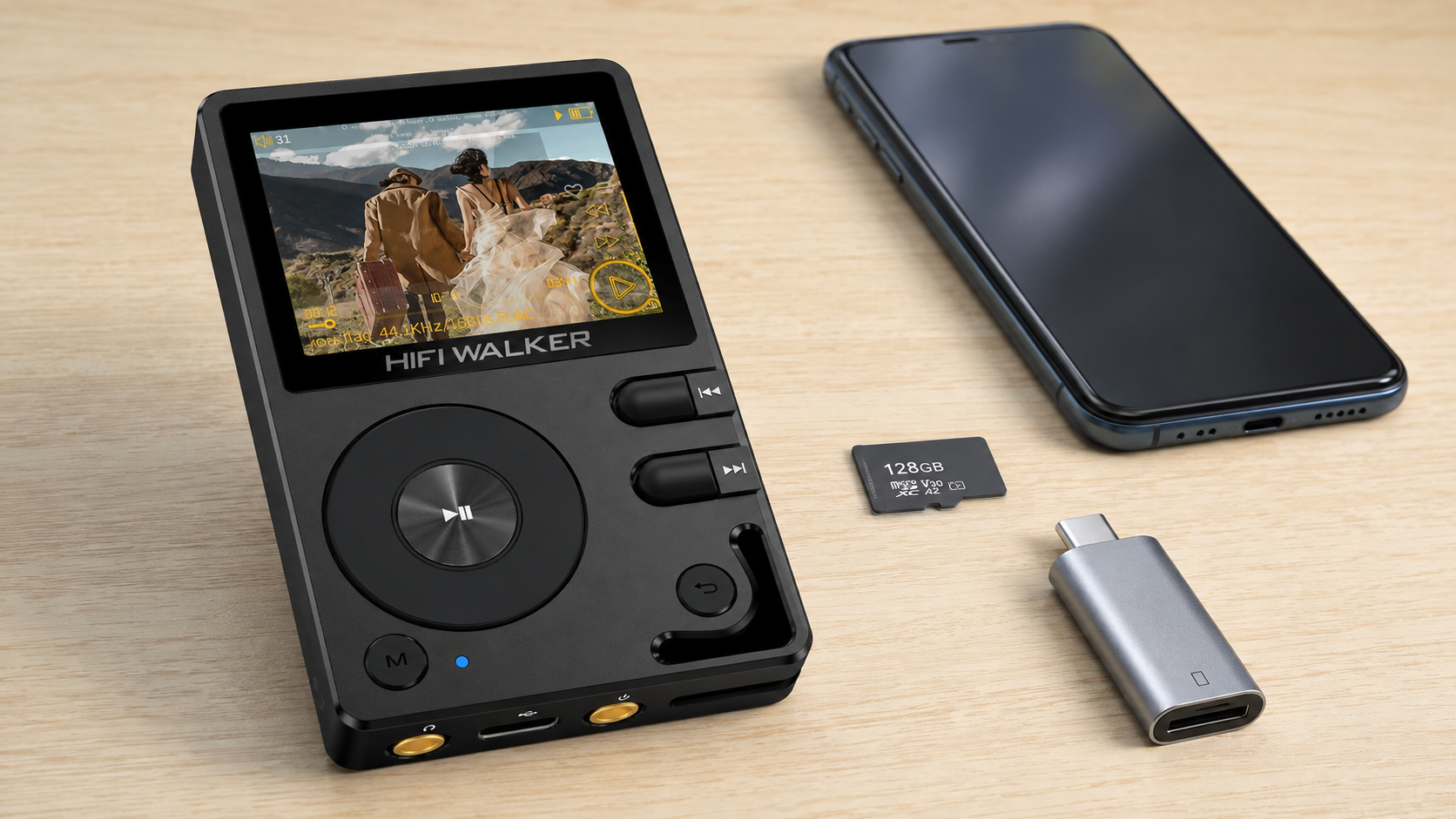
By this point, the underlying question is usually less about how to make a dac work and more about which category actually fits your life. A dongle DAC turns your existing phone into a better source. A dedicated player replaces the phone entirely for music.

Neither approach is a downgrade from the other — they solve different problems. Dongles are cheaper and more flexible across devices. Dedicated players remove your phone's battery, notifications, and background apps from the equation entirely, which matters more than people expect once they've tried it.
Once the DAC is running, a few doors tend to open
Getting a DAC connected is really just the entry point. A handful of people who start here end up going further, almost by accident.
None of this is required to enjoy a DAC. It's just where some people end up after a few months of using one.
Frequently Asked Questions
Q1: How do I connect a DAC to my PC for the first time?
Plug the DAC into a USB port using the correct cable for its connector type, then open your PC's sound settings and manually select the DAC as your playback device. Most DACs work without a driver install for basic stereo playback, though some high-res or professional audio software may prompt you to install one.
Q2: Do I need an amp if I already have a DAC?
It depends on your headphones. Many DAC/amp combo devices, like USB dongles, already include a built-in amplifier stage strong enough for typical headphones. If you're using harder-to-drive headphones or want a separate desktop amp for speakers, then yes, a standalone amp connected after the DAC makes sense.
Q3: Why does a DAC improve sound quality if my headphones already work with my phone?
Your phone's built-in DAC shares power and space with other components, which introduces electrical noise and limits output current. A dedicated DAC isolates the conversion and amplification stage from that interference, which can lower the noise floor and provide cleaner power to your headphones — especially noticeable with detail-heavy or quiet passages.
Q4: Can I use a DAC with my phone, or only with a computer?
Most modern portable DACs work with both, as long as your phone supports USB audio output over its charging port (USB-C or Lightning with the right adapter). Check your phone's specifications, since a few budget phone models restrict USB audio output.
Q5: What's the difference between a DAC dongle and a dedicated digital audio player?
A DAC dongle adds better conversion and amplification to your existing phone or laptop. A dedicated digital audio player has its own storage, DAC, and amplifier built into one standalone device, so it replaces your phone as the music source rather than upgrading it.